
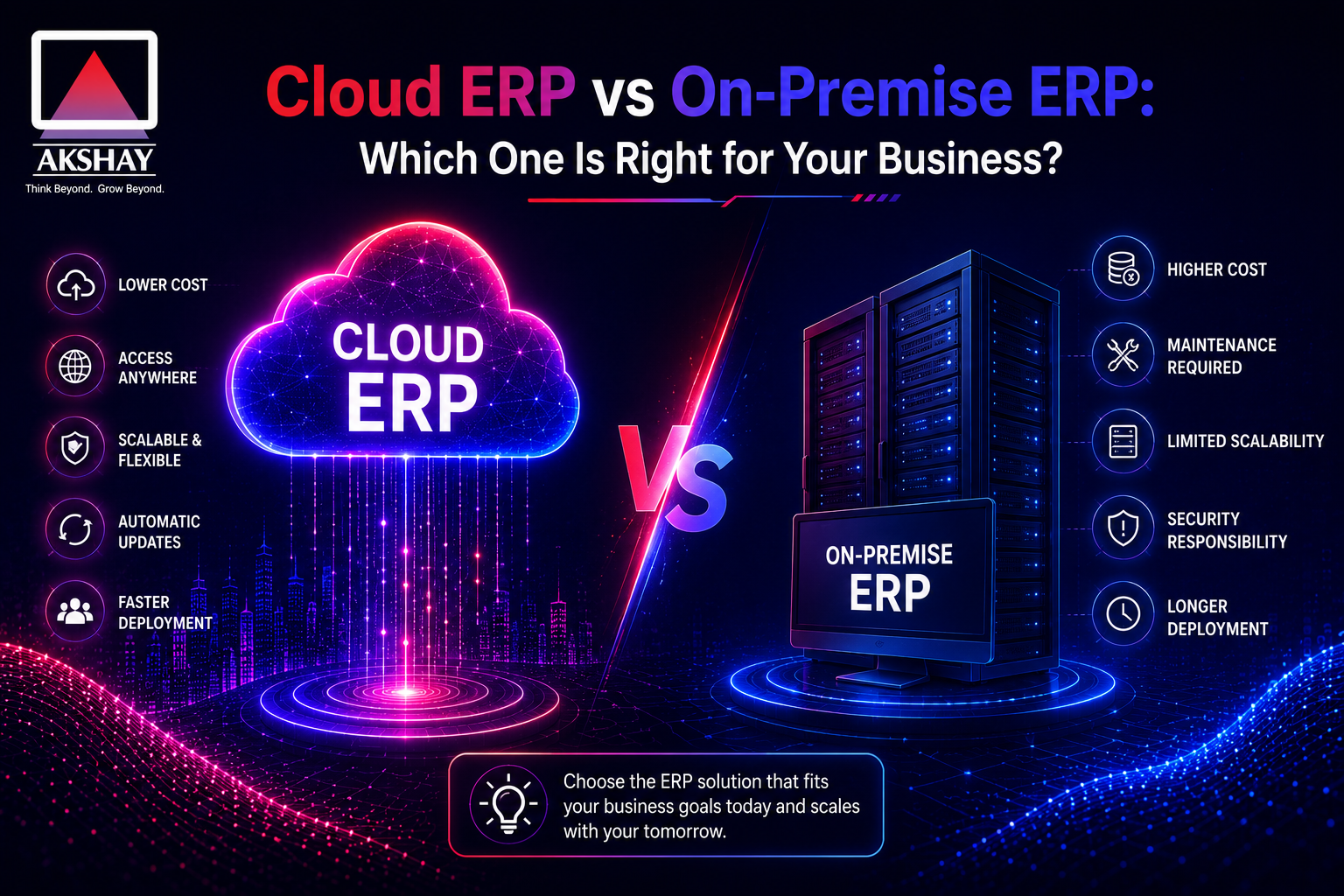
Indian businesses are at a pivotal crossroads today. They must choose between Cloud ERP vs On-Premise ERP for their future. This choice is key to their success.
Deciding between Cloud and On-Premise is more than just a tech choice. It’s a strategic move that affects data, security, and growth. Leaders face a tough decision between flexibility and control.
It’s important to understand these differences for success in the Indian market. By knowing your needs, you can pick the right technology. This ensures your digital transformation goals are met, not blocked.
Key Takeaways
- Modern software architecture directly influences your company’s long-term agility and market competitiveness.
- Web-hosted solutions offer rapid scalability, while local systems provide deep control over sensitive data.
- Total cost of ownership varies significantly between subscription models and upfront capital investments.
- Indian businesses must weigh regulatory compliance requirements when selecting their deployment strategy.
- The right choice aligns your technical infrastructure with your unique operational workflows and growth targets.
Understanding the Core Differences in ERP Deployment
Your ERP strategy starts with where you host your data. Choosing the right ERP deployment model affects how your team uses business info every day. Leaders can match tech investments with goals by looking at these systems’ tech.
Defining Cloud-Based ERP Systems
A Cloud-based ERP runs on servers owned by someone else. Your business uses it over the internet. This means you don’t have to worry about server upkeep.
Flexibility is key here. You can get to your data from anywhere with internet. The provider updates the system automatically, so you always have the latest version.
Defining On-Premise ERP Systems
On-premise ERP systems are hosted on your own servers. This gives your IT team full control over everything. Many in India choose this for data security or unique processes.
This option gives you total autonomy. But, you’re fully responsible for keeping it running. You must handle everything from cooling to security.
| Feature | Cloud-Based ERP | On-Premise ERP |
| Hosting Location | Vendor Data Center | Internal Server Room |
| Maintenance | Managed by Provider | Managed by Internal IT |
| Accessibility | Anywhere via Internet | Local Network/VPN |
| Control Level | Standardized | Full Customization |
The Financial Landscape: Capital Expenditure vs Operational Expenditure
Many Indian businesses face a big choice when it comes to ERP systems. They must balance their cash flow with growth. The right choice depends on how they handle money.
Do they want a big upfront cost or a smaller, ongoing expense? This choice should match their monthly income.
Analyzing Upfront Costs for On-Premise Solutions
On-premise systems need a big Capital Expenditure (CapEx). You must buy hardware, rent space, and pay for software licenses upfront. This can be very expensive for small to mid-sized businesses in India.
There are also hidden costs for keeping the system running. You need to cool it, power it, and have space for it. These costs add up over the first few years.
- Hardware procurement: Servers, networking gear, and storage devices.
- Perpetual licensing: Paying for the software upfront regardless of usage.
- Installation fees: Professional services required for on-site setup and configuration.
Subscription Models and Predictable Cloud Costs
Cloud-based platforms change the financial game to Operational Expenditure (OpEx). With SaaS subscription models, you pay a set fee each month or year. This makes software a service, not a depreciating asset.
This is great for growing companies that watch their money closely. You don’t have to buy too much hardware early on. You can grow your subscription as your team grows.
Predictability is the big win here. You don’t face surprise costs or huge upgrade fees. Your IT spending is easier to plan. This lets you put money into other important areas of your business.
Scalability and Flexibility for Growing Indian Enterprises
Scaling a business in India needs tech that grows with you. Often, initial software choices hold back growth. Using scalable ERP solutions keeps your digital base strong as sales grow.
How Cloud ERP Adapts to Rapid Business Expansion
A Cloud-based ERP is agile for quick market changes. Adding new users is easy with just a few clicks. No need for complex setups or long waits.
These platforms let you add new modules easily. Flexibility is key, as you only pay for what you use. This model supports growth for all businesses.
Limitations of Scaling On-Premise Infrastructure
Traditional systems struggle to keep up with fast-growing companies. Scaling them requires big investments in hardware. This can take weeks or months, slowing you down.
Managing on-premise systems needs a big IT team. If demand spikes, your hardware might not keep up. This can lead to expensive over-provisioning or costly downtime.
| Feature | Cloud-based ERP | On-Premise ERP |
| Scalability Speed | Instant/On-demand | Slow/Hardware-dependent |
| Resource Allocation | Dynamic/Flexible | Fixed/Static |
| Expansion Cost | Subscription-based | High Upfront Capital |
| IT Requirement | Minimal/Managed | High/Internal Staff |
Choosing between these models depends on your growth path. On-premise systems give control, but scalable ERP solutions are faster for today’s success. A Cloud-based ERP lets you focus on strategy, not server management.
Data Security and Compliance in the Indian Regulatory Context
Understanding data security in India is key. As businesses go digital, keeping data safe is top priority. The right choice depends on how well it fits local rules and risk policies.
Security Protocols in Cloud Environments
Top cloud providers spend a lot on security. They use end-to-end encryption and multi-factor auth to block hackers. Clouds offer threat detection that’s hard for companies to match on their own.
Cloud systems meet strict standards. This keeps ERP compliance up to date. It lets businesses grow while the provider handles security.
Maintaining Control with On-Premise Data Sovereignty
Some choose on-premise for full control over data. This keeps data on local servers, ensuring data sovereignty. It’s great for industries with strict rules.
But, it’s up to the IT team to keep it secure. They must update systems to fight new threats. This model needs a lot of money and skilled security staff.
| Feature | Cloud ERP | On-Premise ERP |
| Security Updates | Automated by Provider | Manual/Internal IT |
| Data Location | Distributed/Cloud Data Centers | Local Server Room |
| Compliance Management | Shared Responsibility | Full Internal Control |
| Threat Protection | Advanced AI-Driven | Perimeter-Based |
Implementation Speed and Deployment Timelines
Time is very important for growing businesses in India, when they adopt new technology. The ERP deployment speed you pick affects how fast your team can start using new workflows. Knowing these timelines helps leaders set realistic goals for when projects will be done and ready to use.
Rapid Deployment Advantages of Cloud ERP
Cloud-based solutions are a big plus because they don’t need physical setup. The software is hosted by the provider, so your team skips the long wait for buying and setting up. This streamlined approach means businesses can start using the system in weeks, not months.
Choosing cloud means you can start using it right away through a web browser. This quick start is key for companies wanting to see results fast. Here are the main benefits of going cloud-first:
- Instant Provisioning: Environments are ready for setup almost right away after you subscribe.
- Reduced IT Overhead: Your team doesn’t have to deal with setting up servers and keeping software up to date.
- Scalable Access: Teams all over India can use the system from day one, without needing to set up complex networks.
The Complexity of On-Premise Hardware and Software Setup
On-premise systems take a lot of time before anyone can use them. You need to buy hardware, set up a server room, and install networking gear. These steps slow down the ERP deployment speed a lot, holding back growing companies.
After setting up the hardware, you have to test and connect the software with your current systems. This needs careful work from your IT team and vendors to keep data safe and systems running smoothly. This can cause delays that affect your business goals.
In the end, your choice between cloud and on-premise depends on how long you can wait for setup. Cloud is better for businesses that need to be quick and agile in a fast market.
Maintenance, Updates, and IT Resource Requirements
Choosing between cloud and on-premise solutions depends on your team’s upkeep effort. Every business must decide if they handle tech tasks themselves or use outside help. This ensures operational continuity.
The Role of Managed Services in Cloud ERP
Cloud-based platforms change the game for ERP maintenance. With managed IT services, companies let the vendor handle system administration. This frees up your team to focus on growth.
Without needing to install patches manually, your software stays up-to-date. The vendor takes care of the backend. This lets your team avoid server troubles and focus on growth.
Internal IT Burden for On-Premise Maintenance
On-premise means your team handles all tech needs. This requires a team for tasks like:
- Regular security updates and firewall settings.
- Server upkeep and managing hardware.
- Fixing network issues.
This gives you control but drains your IT resources. Using managed IT services for cloud systems is often cheaper. It avoids the need for a big IT team for ERP maintenance.
| Task Category | Cloud ERP Responsibility | On-Premise Responsibility |
| Software Updates | Vendor Managed | Internal IT Team |
| Hardware Upkeep | Vendor Managed | Internal IT Team |
| Security Patching | Vendor Managed | Internal IT Team |
| System Monitoring | Vendor Managed | Internal IT Team |
Performance and Connectivity Challenges in India
Getting ERP performance right depends on your network. In India, internet speeds can change a lot. This can mess up your work. You need to pick the right setup for your area’s internet.
Overcoming Internet Dependency for Cloud ERP
Cloud systems are fast but need good ERP connectivity to work well. Many Indian companies use two internet services to keep working. They also use SD-WAN to make sure important data gets through fast.
Cloud providers now have special modules for when the internet goes out. Staff can keep working. When the internet comes back, everything updates automatically. This mix of cloud and local systems keeps work going, even when the internet is slow.
Reliability of Localized On-Premise Networks
In places with bad internet, having your own network is better. You can host your server in your building. This means you don’t need the internet to do basic tasks. Your team can always get to important data.
Local networks also have less delay, which is great for fast work or tracking things in real time. You’ll need to take care of your IT more. But, your system will keep working even when the internet is out. Here’s how these setups handle internet problems differently.
| Feature | Cloud ERP | On-Premise ERP |
| Primary Dependency | High (Internet) | Low (Local LAN) |
| Latency Impact | Variable | Minimal |
| Offline Capability | Limited/Module-based | Full Local Access |
| Maintenance Focus | ISP Redundancy | Hardware/Server Uptime |
Customization Capabilities and System Integration
Choosing the right software is key. It depends on how your business handles data and tasks. Customization and integration capabilities show how well your ERP fits your unique needs in India.
Tailoring On-Premise ERP for Unique Business Processes
On-premise ERP systems are great for big companies or those with special needs. You own the code, so your IT team can make big changes. This makes your system fit your business perfectly.
This control lets you set up complex workflows. But, making these changes can make updates hard and expensive later.
Standardization vs Flexibility in Cloud ERP Platforms
Cloud platforms focus on standardization for stability and security. This might seem limiting. But, ERP integration tools have made things more flexible.
Now, businesses can link cloud systems with other apps easily. This keeps things flexible while getting updates from vendors.
| Feature | On-Premise Approach | Cloud Approach |
| Customization | Deep, code-level changes | Configuration and API extensions |
| Integration | Manual, custom-built connectors | Pre-built, scalable connectors |
| Maintenance | High effort after changes | Automated, seamless updates |
| Flexibility | High but creates technical debt | High via modular integration |
A Detailed Comparison of Cloud ERP vs On-Premise ERP
Choosing between Cloud ERP vs On-Premise ERP is tough for Indian business owners. You need to think about your current tech and future plans. This guide will help you make a smart choice.
Feature-by-Feature Comparison Table
This table shows how Cloud ERP and On-Premise ERP differ in key areas. Knowing these differences is essential for a good investment.
| Feature Category | Cloud ERP | On-Premise ERP |
| Upfront Investment | Low (Subscription-based) | High (Capital expenditure) |
| Deployment Speed | Rapid (Weeks) | Slow (Months) |
| IT Maintenance | Managed by Vendor | Managed by Internal Team |
| Data Control | Shared Responsibility | Full Local Sovereignty |
| Scalability | High (On-demand) | Limited (Hardware dependent) |
Key Decision Drivers for Indian Business Owners
Think about what matters most for your business in India. If you need to grow fast and don’t want to deal with IT, cloud is better. It lets you focus on your business, not servers.
If you need to keep data local or customize a lot, on-premise might be right. Look at your setup and budget before deciding. The best choice is one that fits your growth and digital goals.
Assessing Total Cost of Ownership Over Five Years
Looking at ERP implementation costs over five years gives a clear picture. Many businesses only see the upfront cost. But, the Total Cost of Ownership includes ongoing expenses. Knowing these costs is key for growth in India.
Hidden Costs of On-Premise Ownership
On-premise systems have invisible expenses that add up over time. Costs like electricity and cooling for servers are ongoing. These bills can change, making it hard to budget.
Security and IT staff costs are also high. You need to pay good salaries for a team to manage servers and security. Ignoring these costs can lead to big budget problems early on.
Long-term Value of Cloud Subscription Models
Cloud services offer a steady cost with subscription pricing. This helps manage money better. You don’t need to spend a lot on hardware and data centers.
The real value of the cloud is less IT work for you. The provider takes care of updates, security, and maintenance. This lets your team focus on your business. Over five years, this can save money compared to old systems.
Choosing the right model depends on your resources. On-premise gives control, but cloud costs are clearer for the future. A cloud model lets your business grow without worrying about old hardware.
Strategic Considerations for Choosing the Right Model
Creating a strong ERP strategy begins with knowing your current setup. Leaders should look beyond what the software can do. They need to see how it fits into their whole system. This careful choice ensures your investment pays off in the long run, not just now.
Evaluating Your Current IT Infrastructure
Your IT setup affects what deployment path works best. If you have a strong server room and IT team, on-premise might be best. But remember, there are costs for keeping hardware running and for security updates.
On the other hand, if your IT team is small, cloud systems might be easier. They let you focus on your main work. Think about these points when checking your readiness:
- Hardware Lifecycle: Are your servers getting old?
- Internal Expertise: Can your team handle complex database security?
- Connectivity: Does your place have good internet for cloud use?
Aligning ERP Choice with Long-Term Business Goals
A good ERP strategy supports your future plans. If you want to grow fast across India, cloud’s scalability is key. It lets you add users and features easily without buying new hardware.
If you need special manufacturing, on-premise might be better. Strategic alignment means picking what helps you grow. Use this matrix to see what’s best for you.
| Priority Factor | Cloud ERP Focus | On-Premise ERP Focus |
| Growth Strategy | Rapid Scaling | Controlled Customization |
| IT Resource Level | Minimal Internal Load | High Internal Control |
| Budget Structure | Operational Expense | Capital Expenditure |
| Innovation Cycle | Continuous Updates | Scheduled Upgrades |
Your ERP strategy should drive innovation. By picking the right model for your goals, your tech helps you grow. Choose wisely to keep your team focused on growth, not just keeping systems running.
Conclusion
Choosing between cloud and on-premise ERP systems is a big decision. It depends on your company’s goals. No one solution fits all businesses in India.
Cloud options like Oracle NetSuite or SAP S/4HANA Cloud are fast and flexible. They let you focus on your business without worrying about hardware. You get real-time data to help you make quick decisions.
On-premise systems from Microsoft Dynamics or Epicor give you full control. They’re good for companies with strict rules or poor internet. You keep your data safe and in your hands.
Check if your team is ready for a new system before you decide. Think about your IT skills and how much you need to change the system. The right choice will help your business grow and stay competitive.
Look at your business needs now. Talk to experts about how these systems fit with your work. Your choice will affect your company’s success for a long time.