
Running a growing company is like juggling many tasks at once. Many entrepreneurs start with spreadsheets for tracking inventory and sales. But, this method quickly becomes a bottleneck.
As your operations grow, you need a unified view of your data. This is key to staying ahead.
Implementing professional ERP Software is a foundational step for any company ready to scale. It centralizes your core processes. This eliminates data silos and gives you the clarity to make smart decisions.
This transition is essential for effective small business management in today’s fast-paced market.
Choosing the right platform automates repetitive tasks. This lets you focus on long-term growth. Investing in the right ERP Software today keeps your team agile and competitive as you reach new milestones.
Key Takeaways
- Moving away from manual spreadsheets prevents costly data errors.
- Integrated systems provide a single source of truth for all departments.
- Automation saves valuable time for your core team members.
- Real-time data access leads to better strategic decision-making.
- Selecting the right platform is a critical investment for long-term scalability.
Assessing Your Business Needs Before Selecting ERP Software
Starting your digital transformation journey is key. It’s important to check your current workflows first. This ensures operational efficiency across your team.
Understanding your unique challenges helps you pick the right system. This way, you avoid adding more complexity.
Identifying Operational Bottlenecks
Many small businesses in India face issues with manual data entry. They also have disconnected departments. These problems lead to delays in reporting and decision-making.
Identifying these bottlenecks is the first step toward business automation.
Look for tasks that take up a lot of time. If your inventory team uses spreadsheets, you’re losing time. Finding these inefficiencies helps you focus on the most important features.
Defining Scalability Requirements
Your software should grow with your company. When looking at solutions, think about your future needs. A system for ten employees might not work for fifty.
Consider your goals for the next three to five years. Will you need to add new branches or manage more products? Choosing a flexible platform ensures your technology supports your growth.
Budgeting for Software and Implementation
Don’t just look at the initial cost. True ERP implementation like Crest ERP costs include training, data migration, and maintenance. You need to budget for these hidden costs to avoid overspending.
Make a detailed budget for software and setup services. Proper planning saves money in the long run. Use the table below to compare your priorities.
| Assessment Area | Primary Goal | Key Metric | Priority Level |
| Operational Flow | Reduce manual errors | Time per task | High |
| System Scalability | Support future growth | User capacity | Medium |
| Total Budget | Control hidden costs | ROI percentage | High |
| Team Readiness | Ensure user adoption | Training hours | Medium |
Key Features to Look for in Small Business ERP Solutions
Modern small business management needs an ERP system that does it all. It should put all your operations in one place. This way, you avoid data silos and boost productivity.
Choosing the right ERP means your team can focus on growing your business. They won’t get bogged down in manual tasks.
Financial Management and Accounting Modules
A top-notch ERP has strong accounting software for your finances. It handles tasks like taxes, payrolls, and invoices. Accuracy is key for managing money, which is fast-paced in India.
With automated reports, you see your profits and costs clearly. A system that follows local rules saves you time. This way, your books are always ready for audits.
Inventory and Supply Chain Tracking
Good inventory management is key to a strong supply chain. Real-time tracking lets you see stock levels everywhere. This helps avoid stockouts and cuts down on costs.
Automated tracking gives you control over buying and selling. Alerts for low stock help you not miss sales. Meeting demand is easier with up-to-date data on your stock.
Customer Relationship Management Integration
Seamless CRM integration gives a clear view of customer interactions. Your sales team can offer better service with access to order history. This keeps your customer service team informed.
Linking CRM with other ERP parts means all data is in one place. This helps marketing and sales work together better. Unified data means faster service and happier customers.
| Feature Category | Primary Benefit | Operational Impact |
| Financial Modules | Automated Compliance | Reduced Accounting Errors |
| Inventory Tools | Real-time Tracking | Lower Carrying Costs |
| CRM Integration | Unified Client Data | Improved Customer Retention |
Evaluating Top ERP Software Options for the Indian Market
The Indian business software scene is special. It needs tools that follow local rules and are efficient. Picking the right ERP software means knowing how it deals with local taxes and business ways. You can find the best fit by comparing local options with global cloud leaders, based on your business size.
TallyPrime for Simplified Accounting
TallyPrime is top for small businesses in accounting software. It’s known for being easy and works well with the Goods and Services Tax (GST). It’s great for companies that want simple financial reports and easy use, not complex systems.
Zoho ERP for Cloud-Based Flexibility
Zoho is best for teams that need to work together online. It’s a Cloud ERP that lets you start simple and add more as you grow. This flexibility means your tech can grow with your business, without a huge cost at the start.
SAP Business One for Growing Enterprises
SAP Business One is for companies that need more than basic tools. It’s great for handling big supply chains and tracking lots of inventory in different places. It’s a strong Indian business software for big companies that need to make smart, long-term plans.
| Platform | Primary Strength | Best For |
| TallyPrime | GST Compliance | Small Accounting Teams |
| Zoho ERP | Cloud Accessibility | Agile, Growing Businesses |
| SAP Business One | Advanced Scalability | Large-Scale Enterprises |
Understanding Pricing Models and Total Cost of Ownership
Understanding enterprise software costs is key. Many owners focus on the initial cost. But, they often overlook the ERP pricing that affects their finances over time.
Subscription-Based SaaS Pricing
Today, many businesses choose Cloud ERP for its predictable costs. These SaaS solutions mean no big upfront costs for hardware or server upkeep.
Choosing a subscription model offers updates and flexibility. It lets small businesses grow without paying for unused features.
On-Premise Licensing Costs
On-premise systems require a big upfront payment for software licenses. This model saves on subscription fees but adds IT management costs.
Physical servers, cooling, and security personnel add up. These costs can be higher than cloud options over time.
| Cost Factor | SaaS Model | On-Premise Model |
| Initial Investment | Low (Subscription) | High (License) |
| Maintenance | Included in Fee | Internal Responsibility |
| Scalability | High/Instant | Limited/Hardware Dependent |
Hidden Expenses in Implementation and Training
Calculating total cost of ownership means looking beyond the license. Data migration and specialized training are often overlooked.
Without proper training, your team may face challenges. This can lead to lost productivity and errors.
Always plan for unexpected costs. Being ready for these expenses helps keep your digital transformation affordable.
Step-by-Step Guide to Implementing Your Chosen System
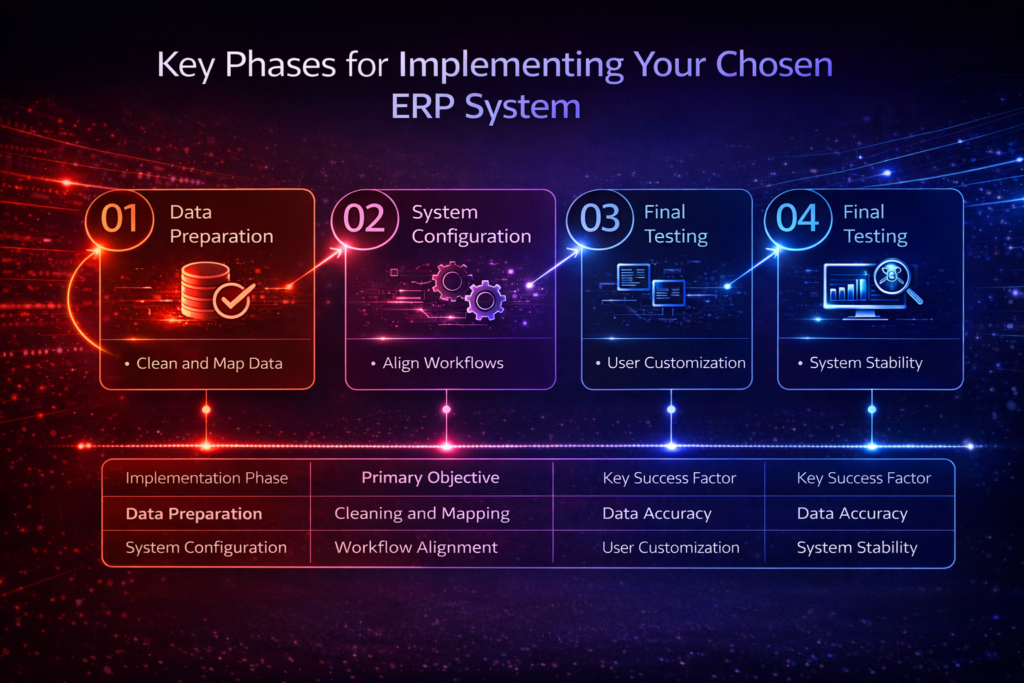
For a successful ERP implementation, you need a clear plan. This plan should focus on keeping data clean and workflows smooth. Moving from old systems to a new one takes time and care. By following a step-by-step approach, you can avoid problems and make the transition easier.
Preparing Data for Migration
The first step in data migration is to make sure your data is good. Clean your databases to get rid of duplicates and old information. This helps avoid problems when you start using the new system.
Match your old data fields to the new system’s setup. Make sure your financial and customer data is ready for the import. Checking this data early saves a lot of work later in the ERP deployment.
Configuring Modules to Match Business Workflows
Good software configuration makes the system fit your business, not the other way around. Start by looking at the main workflows that make your business run. Customize settings to make tasks like invoicing and inventory updates automatic.
Get your team leaders involved to make sure the setup works for everyone. While templates are helpful, making the system fit your specific needs in India will help your team use it better. A system that feels natural is more likely to be accepted by your staff.
Testing the System Before Full Deployment
Testing is key before you go live with your new system. Do User Acceptance Testing (UAT) to check that everything works as it should. This is also a good time to start ERP training for your key users.
Try out the system under heavy use to see how it handles busy times. If you find problems, report them right away. A good testing phase makes sure your switch goes smoothly and keeps your team working without interruption.
| Implementation Phase | Primary Objective | Key Success Factor |
| Data Preparation | Cleaning and Mapping | Data Accuracy |
| System Configuration | Workflow Alignment | User Customization |
| Final Testing | Bug Resolution | System Stability |
Training Your Team for Successful ERP Adoption
Your ERP system is only as good as the team using it. The human element is key to success. Good ERP training makes your team confident from the start.
Creating Role-Specific Training Programs
Generic training can make people feel left out. Instead, make training fit each department’s needs. This way, everyone sees how the software helps them.
- Finance Teams: Focus on automated ledger entries and tax compliance reporting.
- Warehouse Staff: Prioritize mobile scanning, stock updates, and real-time inventory tracking.
- Sales Representatives: Emphasize CRM integration and lead management features.
Managing Change and Overcoming Resistance
New tech can make people nervous. Good change management means explaining why it’s needed. Leaders should talk about how it will help the company grow.
Find “change champions” in each department. They can help answer questions and show the positive impact of the new system. This helps everyone feel more open to change.
Establishing Internal Support Channels
Users will have questions after the system is live. Having clear support channels helps avoid frustration. It keeps everyone working well during the change.
Here are some ways to keep support strong:
- Internal Help Desk: A dedicated ticketing system for reporting bugs or workflow issues.
- Super-User Network: A group of trained power users available for quick, desk-side assistance.
- Knowledge Base: A centralized repository of video tutorials and step-by-step guides tailored to your business processes.
Optimizing ERP Performance for Long-Term Growth
Businesses in India see their ERP systems as living things that grow with them. After setting up your system, the real work starts to get the most out of it. This is key for growing your business as it gets bigger.
Regular System Audits and Updates
Technology changes fast, and so should your software. Doing regular system audits helps find problems before they cause trouble. These checks also keep your system safe from new threats.
It’s important to install updates and patches right away. These updates often make your system run better. Keeping up helps keep your data safe and your system reliable.
Leveraging Analytics for Data-Driven Decisions
Today’s systems can turn data into useful information. Using ERP analytics lets leaders see how things are going in real time. This helps make every part of the business run better.
Decisions based on data help plan better. Knowing your costs and how you use resources helps you change fast when needed. Empowered leaders use this info to make things run smoother and save money.
Integrating Third-Party Applications
Your ERP should connect to all your digital tools. CRM integration makes sure everyone sees the whole picture of customer interactions. This stops information from getting stuck in one place and helps teams work together better.
Also, adding special tools to your ERP can make things more automated. Here are some ideas to make your business run smoother:
- Inventory management software for keeping track of stock.
- Payment gateways to speed up billing and getting paid.
- E-commerce platforms to link online orders with your warehouse.
Adding these tools makes your business more connected. This interconnected approach helps your business grow while keeping everything under control.
Common Pitfalls to Avoid During ERP Deployment
Going digital can be smooth if you avoid common traps. Many in India rush into ERP deployment without thinking about the challenges. Knowing these risks early helps protect your investment and boosts your return.
Underestimating Data Cleaning Requirements
One big mistake in data migration is thinking old records are ready for new systems. If you bring in bad data, your new system will give wrong reports from the start. Garbage in, garbage out is true in enterprise software.
Before moving data, check your current databases. Cleaning your data makes sure your ERP implementation starts right. This step stops system errors that often happen at the start.
Ignoring User Feedback During Configuration
Good software configuration needs input from users. If managers decide workflows without talking to staff, the system won’t meet real needs. This leads to low use and staff frustration.
Make a way for employees to give feedback during setup. When staff feels heard, they’re more likely to use the new tech. Collaborative design helps build a system that supports your business goals.
Failing to Plan for Post-Launch Support
Many see the go-live date as the end, but it’s just the start. Without a plan for post-launch support, small issues can become big problems. Make sure your IT team or vendor is ready for quick fixes.
Set up a help desk or support channel for the transition. Long-term stability comes from solving problems fast. Ongoing support keeps your business running smoothly as it grows.
Conclusion
Choosing the right digital tools is key for any growing business in India. Platforms like TallyPrime, Zoho ERP, or SAP Business One help you see your future goals clearly. Planning well makes using these tools easier and more efficient.
Success comes from training your team and keeping the system running smoothly. A skilled team makes sure every part of the system works well. This is how you stay ahead in a tough market.
Regular checks keep your data right and your work flowing smoothly. Using real-time analytics helps you make better choices every day. This way, you protect your investment and grow in a healthy way.
Start making your business modern today. Look at what’s holding you back and get your team ready for new tech. Your path to being better starts with one smart move.