
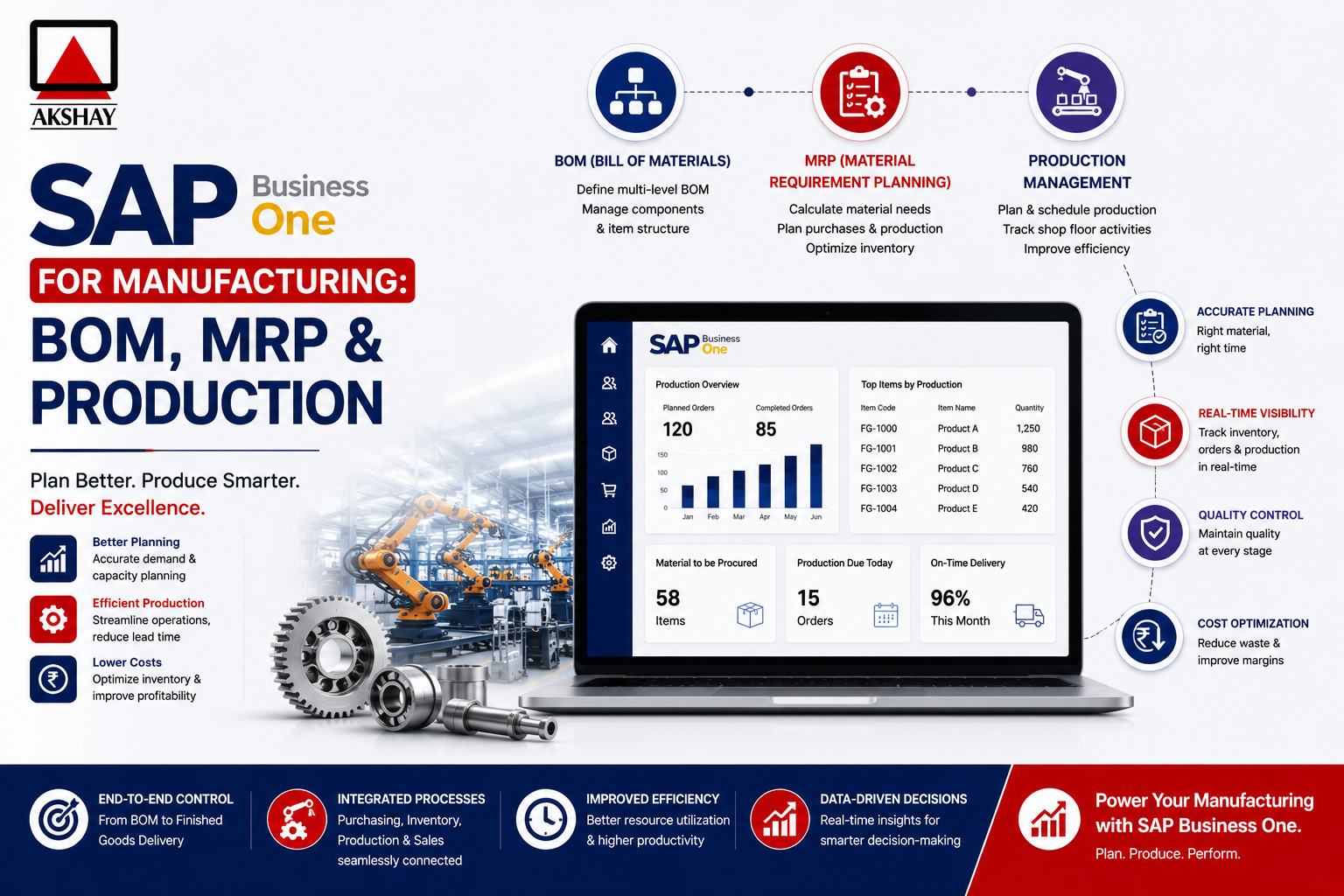
Modern industrial firms in India need to work smarter to stay ahead. SAP Business One for Manufacturing offers a strong solution for these challenges.
ERP system gives local businesses full control over their production process. It helps teams make better choices, leading to growth and success.
Using SAP Business One for Manufacturing brings clear views across all departments. It makes workflows smoother, giving you an edge in a competitive market.
Key Takeaways
- Centralize production data to improve operational transparency.
- Utilize advanced tools to manage complex bills of materials.
- Enhance decision-making through real-time reporting features.
- Streamline material requirements planning to reduce waste.
- Gain a competitive advantage within the growing Indian industrial sector.
Understanding the Manufacturing Capabilities of SAP Business One
SAP Business One is a central hub for your production lifecycle. It connects all stages into one system. This ensures your team works together towards production goals.
This unified approach breaks down information silos. These silos can slow down growth in competitive markets.
The platform supports both discrete and process manufacturing easily. It works well whether you’re making complex machinery or chemical formulas. This flexibility helps Indian manufacturers grow without changing software.
Good coordination between departments is key to success. SAP Business One gives real-time updates on inventory, procurement, and production. This way, sales, purchasing, and production teams can work together smoothly.
When everyone has the same data, your company can consistently meet delivery deadlines. It also helps keep quality high.
| Feature | Discrete Manufacturing | Process Manufacturing |
|---|---|---|
| Primary Focus | Assembly of distinct parts | Formulas and recipes |
| Inventory Tracking | Serial and batch numbers | Potency and expiry dates |
| Production Output | Finished goods units | Weight or volume batches |
| System Flexibility | High configuration support | Recipe version control |
Using these powerful tools, you can monitor resources well. The system spots bottlenecks early. This control helps your business succeed in India’s fast-paced industrial scene.
Setting Up Your Production Environment in India
Success in the Indian manufacturing industry begins with a well-organized production area. The right digital tools can change how your factory floor works every day. A clean setup keeps your data right and your workflows efficient.
Configuring Warehouse Locations and Bin Management
Good inventory management is key for any production facility. In SAP Business One, you can set up specific warehouse locations to match your physical space. This makes it easy to track raw materials and finished goods.
Using warehouse bin management lets your team find items quickly. Assigning unique codes to shelves and racks cuts down search time. This is essential for keeping efficiency high in India’s fast-paced production settings.
Defining Resource Groups and Capacity Planning
After organizing your inventory, focus on your production assets. Resource capacity planning shows how much your machines and labor can handle. Grouping similar resources gives a clear view of your total output.
Optimizing throughput means balancing machine availability and labor shifts. You can set up groups for maintenance downtime or specific skills. This stops bottlenecks before they affect your delivery times.
| Setup Component | Primary Benefit | Operational Impact |
|---|---|---|
| Warehouse Bins | Inventory Accuracy | Reduced Picking Errors |
| Resource Groups | Capacity Visibility | Improved Scheduling |
| Location Mapping | Material Flow | Lower Handling Costs |
Creating Accurate Bills of Materials
Every complex assembly starts with a detailed Bill of Materials in SAP Business One. These documents are the primary blueprint for your production cycle. They keep your procurement and assembly teams in sync.
Structuring Multi-Level BOMs for Complex Assemblies
For complex products, a simple list of parts won’t do. You need a Multi-level BOM to show the hierarchy of sub-assemblies and raw materials. This lets you track costs and lead times at each production stage.
Effective BOM management means clearly showing your production flow. By nesting sub-assemblies in the parent item, you see your inventory needs clearly. This helps Indian manufacturers cut waste and boost shop floor efficiency.
Managing Component Substitutions and Versioning
Supply chain disruptions happen often today. Being able to swap components without stopping production is a big plus. SAP Business One lets you set up alternative items, so your assembly line keeps running even when parts are out.
Versioning is key for keeping quality high. As you update your product designs, you can make new versions of your Multi-level BOM. This keeps your history safe while guiding future production.
Learning these tools boosts your BOM management a lot. Consistency in your documents means fewer mistakes and more profit for your manufacturing business.
Mastering Material Requirements Planning
Mastering material requirements planning is key to a smooth Indian manufacturing facility. It aligns your supply chain with market demand. This avoids overstocking and delays.
This approach ensures resources are ready when needed.
Configuring MRP Wizards for Demand Forecasting
The MRP wizard is your production’s brain. It analyzes sales data and open orders for accurate demand forecasts. Setting planning horizons keeps production planning in sync with seasonal changes in India.
Right setup defines lead times and safety stock levels. This detail is vital for resource capacity planning. It ensures machines and labor are used well without bottlenecks.
When set up right, it cuts waste and maximizes investment.
Interpreting MRP Results and Generating Recommendations
The wizard’s results offer clear recommendations. Reviewing these helps spot shortages early. Understanding these insights is key for smart procurement and assembly planning.
The system tells you what to order and when to start production. This clarity removes daily operation guesswork.
The table below shows how automated planning beats manual methods:
| Feature | Manual Planning | Automated MRP |
|---|---|---|
| Data Accuracy | Low (Human Error) | High (Real-time) |
| Response Time | Slow | Instant |
| Stock Levels | Often Excess | Optimized |
| Scalability | Limited | High |
Automating Purchase Orders and Production Orders
Manufacturing automation shines in turning recommendations into orders with a click. It creates purchase or production orders from MRP results. This saves hours of manual work each week.
Using MRP software ensures orders are based on verified demand. This cuts down on errors and keeps production steady. Adopting these digital tools keeps your business competitive and agile.
Executing Production Orders Efficiently
Mastering the lifecycle of a production order can boost your manufacturing efficiency. A well-run shop floor means you meet deadlines and keep output high. Optimizing these workflows is key for any growing business in India.
Converting Planned Orders to Released Production Orders
The first step is turning a planned order into a released production order. This tells your team it’s time to start making. A Multi-level BOM helps identify all parts needed for the project.
Once released, the order is clear to your production team. This lets your warehouse team pick materials right away. Clear communication between planning and execution avoids delays.
Managing Issue for Production and Backflushing
Material management is at the core of Manufacturing automation. You can manage material use in two ways: manual issue or backflushing. Manual issue gives precise control, while backflushing automatically subtracts materials as they’re used.
- Manual Issue: Best for high-value components needing strict tracking.
- Backflushing: Ideal for low-cost, high-volume items to save time.
Choosing the right method depends on your production needs. Consistency in recording these issues keeps inventory levels accurate.
Recording Receipt from Production and Quality Checks
The last step is recording finished goods into inventory. As items leave the production line, quality checks must be done. This step ensures only good products reach customers.
Use the table below to track production status:
| Stage | Action Required | System Impact |
|---|---|---|
| Release | Verify BOM availability | Inventory reservation |
| Issue | Record consumption | Stock reduction |
| Receipt | Perform quality check | Stock increase |
Accurate documentation of these receipts offers valuable insights into production performance. This data helps improve processes and quality over time.
Optimizing SAP Business One for Manufacturing
Smart manufacturers see optimization as a journey, not a goal. They keep their workflows sharp to stay ahead in India’s fast market. Using SAP Business One for Manufacturing helps them stay competitive by making smart, data-driven changes.
Leveraging Real-Time Inventory Visibility
Good inventory management means knowing what you have and where. With real-time visibility, you can plan without guessing. This stops delays and keeps your supply chain running.
Use advanced warehouse bin management to control your storage. Organizing bins helps you manage materials better. This ensures your team picks the right items for each order.
Integrating Shop Floor Data Collection
Getting accurate data from the production line is key for growth. By integrating shop floor data collection, you connect planning with reality. This helps spot problems before they cost you money.
Strong shop floor control tracks important data like labor and output in real time. Empowering your staff to log data as it happens builds a culture of precision. This leads to better processes and higher efficiency across your whole company.
Handling Subcontracting Processes in the Indian Context
Managing outsourced manufacturing is key for growing businesses in India. Many firms use external partners for certain production steps. Effectively coordinating these tasks in your ERP system keeps your supply chain flexible and quick.
Managing Outsourced Manufacturing Operations
SAP Business One makes subcontracting processes easy. You can set up vendor services as items. This lets you send production orders to external partners.
This method keeps your material requirements planning on track. It also accounts for the time it takes for third-party vendors to deliver.
Centralizing these workflows gives you real-time visibility into your outsourced goods. You can see the progress of each order. This helps avoid delays and keeps your production schedule on track.
Tracking Raw Material Consumption at Vendor Sites
Keeping accurate inventory records is key when raw materials are at a vendor’s site. You need to track their use to control costs and avoid stock issues. SAP Business One lets you send materials to a vendor’s warehouse. This keeps them separate from your main stock.
After the vendor finishes production, you can record material use against the finished goods receipt. This seamless integration makes sure your material requirements planning is up to date. Keeping real-time visibility over these remote stocks is important for audits and financial accuracy.
| Metric | Internal Production | Subcontracted Production |
|---|---|---|
| Resource Control | High | Limited |
| Cost Transparency | Direct | Service-based |
| Inventory Risk | Internal | Vendor-managed |
| Lead Time | Short | Variable |
Cost Accounting and Variance Analysis
Profitability depends on tracking every rupee spent in making things. Cost accounting in your ERP helps keep your profits safe in a tough market.
Production order execution lets you see data in real time. This is key to finding out where resources are used well or wasted.
Calculating Standard vs Actual Production Costs
Manufacturers set standard costs based on expected prices and labor hours. But, prices in India can change a lot.
SAP Business One lets you compare standard costs with actual ones. This shows where you might be spending too much on materials or downtime.
| Cost Category | Standard Cost | Actual Cost | Variance |
|---|---|---|---|
| Raw Materials | ₹500 | ₹550 | +₹50 |
| Direct Labor | ₹200 | ₹180 | -₹20 |
| Overhead | ₹100 | ₹120 | +₹20 |
Analyzing Production Variances for Profitability
When you find a variance, you need to find out why. This helps improve production efficiency. It could be because of higher prices or not working well on the shop floor.
Checking these variances often keeps your cost accounting right. By making changes based on this, you can make more and keep your profits up.
Keeping an eye on these numbers helps your business grow. This careful work turns data into a big advantage for your company.
Ensuring Compliance and Reporting for Indian Manufacturers
Every business in the Indian manufacturing industry must navigate complex rules. Keeping records accurate is not just good practice; it’s the law. By digitizing your work, you can make compliance easier and more efficient.
Generating Statutory Production Reports
Statutory reporting is key to providing clear, ready-to-audit documents to the government. SAP Business One tracks your production from start to finish. This makes it easy to check if your costs match your plans.
Automated reports offer big benefits for your team:
- Real-time tracking for regulatory needs.
- Quick access to past data for audits.
- Less chance of mistakes in manual reports.
- Clear view of how resources are used.
Aligning Production Data with GST Requirements
Keeping up with GST compliance is critical for Indian factories. Your data must show the tax impact of every move, including subcontracting processes. A well-set-up ERP system automatically links production to the right tax codes, keeping your filings on track.
The table below shows the difference between manual tracking and using an ERP system:
| Feature | Manual Tracking | Automated ERP |
|---|---|---|
| Data Accuracy | High risk of errors | High precision |
| GST Compliance | Time-consuming | Real-time updates |
| Audit Readiness | Needs manual prep | Instant reporting |
By linking your shop floor data with financial modules, you ensure all tax credits are recorded right. This approach to GST compliance helps avoid fines and keeps your business running smoothly all year.
Common Implementation Challenges and How to Overcome Them
Switching to a new ERP system is a big step for any growing Indian manufacturer. The benefits of going digital are clear. But, making sure everything works smoothly needs careful planning.
By knowing what might go wrong, your team can keep working well. This is true from start to finish.
Data Migration Best Practices
Getting your old data into new MRP software is the trickiest part. First, check your data for anything you don’t need anymore. Clean data helps you plan better and schedule production right.
Try moving data in a test area first. This helps find and fix any mistakes. It makes sure everything works right before you switch for real.
Training Your Shop Floor Staff for Success
Technology works best when people use it every day. To get better at shop floor control, train your staff in real-life situations. When they see how their work affects the whole process, they’re more likely to use the new tools well.
Choose some staff to be “super users” who help others. This way, everyone learns from each other. It builds confidence and keeps GST compliance high. Regular feedback helps your team feel supported as they learn.
| Challenge Category | Primary Risk | Strategic Solution | Expected Outcome |
|---|---|---|---|
| Data Integrity | Inaccurate legacy records | Pre-migration data cleansing | Reliable MRP software output |
| User Adoption | Resistance to new workflows | Role-based hands-on training | Higher shop floor control |
| Regulatory Needs | Reporting errors | Automated tax mapping | Seamless GST compliance |
| System Integration | Process bottlenecks | Phased implementation approach | Optimized production flow |
Conclusion
SAP Business One helps improve your production in India. It lets your team work better and be more precise. This makes your work smoother and more accurate.
Good BOM management is key to success. It keeps your production running smoothly. You can grow your output without losing quality or speed.
Knowing your costs is important for profits. SAP Business One helps you track all expenses. This lets you make better choices in a tough market.
Following local laws is a big deal for business owners. SAP Business One makes it easier to meet these rules. It helps you stay on top of taxes and focus on growing your business.
Starting your digital journey is easy. Just contact your SAP partner to start. You’ll unlock your facility’s full power and build a strong future for your brand.