
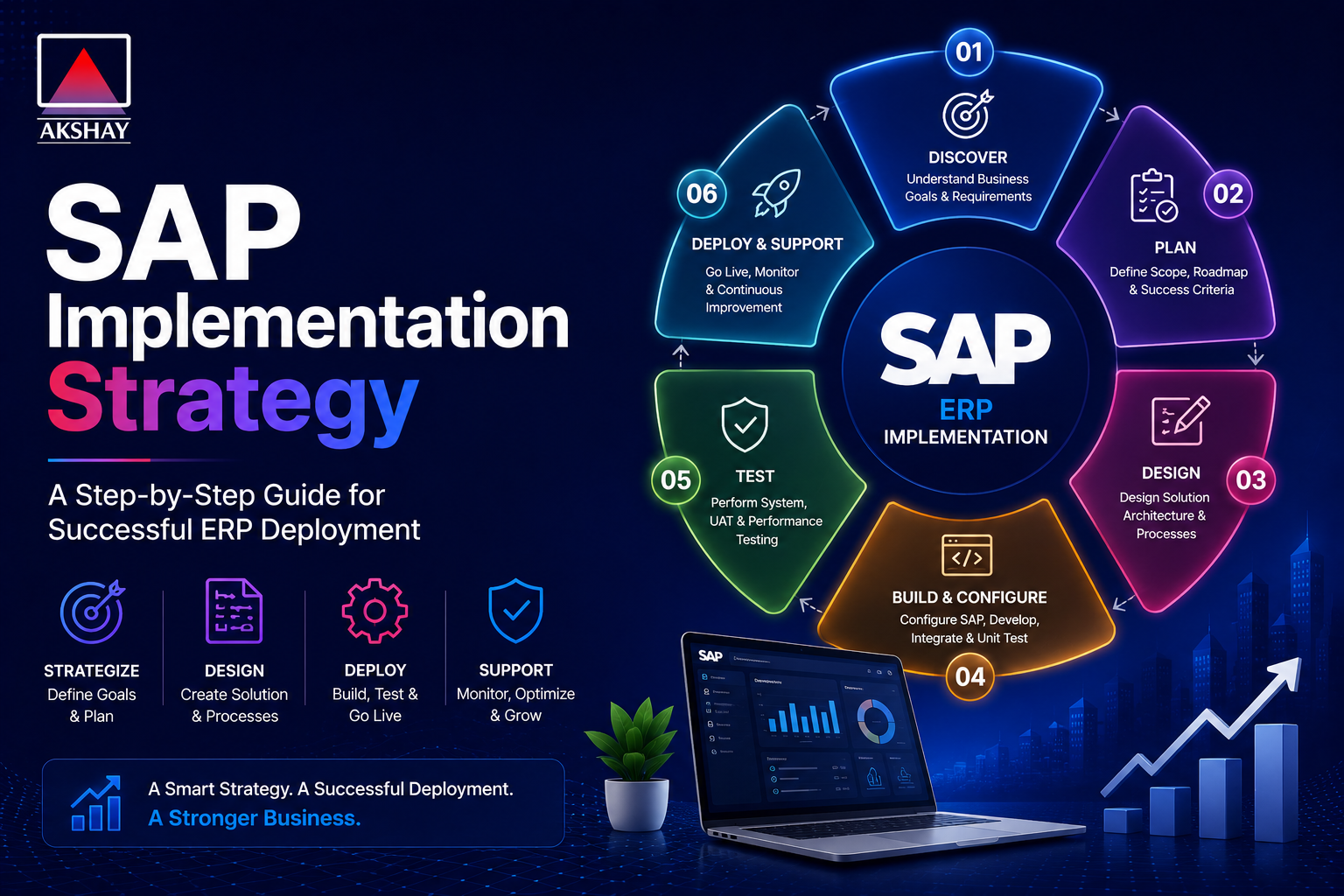
In today’s fast world, businesses must keep up to stay ahead. A strong SAP Implementation Strategy is key for growth. Without a clear plan, companies often face delays and problems.
A well-planned ERP deployment is vital for lasting digital transformation. It links your tech goals with your business aims. By focusing on planning, leaders can steer clear of common issues that can stop software changes.
Success is more than just getting new tools. It means changing how your team works with data and daily tasks. Spending time on preparation keeps your company competitive and quick to adapt in a changing world.
Key Takeaways
- A solid plan is the most important thing to avoid project failure.
- Modern software changes are the foundation for future growth.
- Good preparation cuts down on risks during the changeover.
- Matching tech goals with business needs brings long-term benefits.
- Digital change needs new tech and a change in how the company works.
Defining Your SAP Implementation Strategy
Creating a strong SAP Implementation Strategy means looking closely at what your business needs. Before starting any ERP deployment, check if your company is ready for it. This is key for success in the long run.
Assessing Business Readiness and Objectives
Starting well means knowing your business inside out. Focus on business readiness first. This helps spot any issues that could slow down the change.
Make sure your tech goals match your company’s big picture. This way, every team sees the value of the new system. Clear objectives guide your team through the digital change.
Selecting the Right SAP Solution for the Indian Market
The Indian business landscape has its own set of challenges. Picking the right software means looking at how it meets local laws and handles local ways of doing things.
Your choice should grow with your business but also be flexible. SAP S/4HANA, for example, has features that fit India’s needs well. Strategic selection makes a big difference between a system that works and one that grows your business.
Think about these things when picking your solution:
- Compliance capabilities for local tax rules.
- Scalability for future growth in different areas.
- Integration with local banking and logistics systems.
Assembling the Implementation Team
Creating a top-notch project team is key for a smooth SAP rollout. A well-organized team keeps the project moving and makes sure goals match your company’s vision. Choosing the right people sets the stage for long-term success.
Identifying Internal Stakeholders and Champions
The success of your digital change depends on key people from all departments. You need to find champions who know the current ways of working and are ready for new tech. They connect the tech team with the rest of the staff.
Good communication is essential here. It helps everyone understand the project’s aims. By getting department heads involved early, you boost business readiness and cut down on problems later. These champions will help spread the use of the new system across the company.
Partnering with Certified SAP Implementation Consultants in India
Dealing with the Indian market’s complexities needs special knowledge. You should work with certified SAP consultants who know about local laws like GST and taxes. Their know-how helps avoid common mistakes in big ERP projects.
When looking for partners, focus on those with a strong track record in your field. A good partner does more than just tech support; they offer strategic advice to get you ready for business. Choosing the right SAP consultants makes sure your system works well and meets Indian business rules.
- Check if the partner knows local laws well.
- Make sure they have the right certifications and success stories.
- Look for a team that offers help after the project is done.
Project Planning and Scoping
Good project management is key for any big software launch. Without a plan, projects can get out of control. This can mess up even the best digital plans. By setting clear goals from the start, companies can keep their project on track.
Defining Project Boundaries and Deliverables
It’s important to know what’s in the project. You need to list the business processes the new system will handle. This makes sure SAP consultants focus on what really matters.
Deliverables should be clear and easy to measure. This could be setting up a module or a report on data migration. Each goal must be well-defined to avoid confusion.
Establishing Realistic Timelines and Milestones
Setting realistic deadlines keeps the project moving. Break it down into smaller parts to track progress better. This way, you can adjust plans as needed.
Here are some important milestones for your project:
- Initial requirement gathering and gap analysis.
- System design and blueprint finalization.
- Core module configuration and testing.
- Final user training and system go-live.
Managing Dependencies and Resource Allocation
Good project management means knowing how tasks depend on each other. You need to spot technical dependencies early to avoid delays. Proper resource allocation ensures SAP consultants are used well when it counts.
The table below shows how resources are used in different project stages to keep costs in check:
| Project Phase | Primary Resource Focus | Expected Outcome |
| Planning | Project Managers | Defined Scope |
| Configuration | SAP Consultants | System Setup |
| Testing | Quality Analysts | Bug-free Environment |
| Deployment | Support Teams | Successful Go-Live |
Data Migration and Management
Switching to a new ERP system needs careful handling of your current data. Data migration is a big challenge when leaving old legacy systems behind. Without a solid start, even top software can’t give you the right insights.
Cleaning and Validating Legacy Data
Your team must check all data before moving it to the new system. They look for duplicates, fix formatting mistakes, and get rid of old files. Accuracy is key at this time to avoid mistakes in the new system.
Setting up rules for data checks keeps everything consistent. This makes sure your reports are reliable. It also helps avoid system problems when you switch over.
Mapping Data to SAP S/4HANA Structures
After cleaning, the data needs to fit SAP S/4HANA‘s special design. This system has a different data model than old ones. Your team must map old fields to the new ones carefully.
They need to know both the old and new systems well. Planning ahead helps avoid losing data and keeps past trends for future use. This way, your company can use real-time analytics right away.
Ensuring Compliance with Indian Data Privacy Regulations
Working with sensitive data means following local laws, like the Digital Personal Data Protection (DPDP) Act. You must keep all data in SAP S/4HANA safe and follow Indian rules. Compliance is important for your company’s responsibility.
Using strong encryption and access controls protects data during the move. This builds trust and avoids legal issues. Here’s a table showing a safe migration plan’s main steps.
| Migration Phase | Primary Objective | Risk Level |
| Data Cleansing | Remove redundant records | Low |
| Schema Mapping | Align with S/4HANA | High |
| Privacy Audit | Ensure DPDP compliance | Critical |
| Final Validation | Verify system integrity | Medium |
Configuring the SAP Environment
Turning standard software into a custom business tool is key in your ERP journey. Setting up your SAP S/4HANA environment needs a deep understanding of your workflows. This setup aligns technical settings with your business goals, supporting growth and efficiency.
Customizing Modules to Meet Local Business Requirements
Every business in India has its own needs, like specific tax reports and regional supply chains. You must adjust your SAP modules to match these needs without harming the system’s stability. Precision is key when changing standard processes to fit your business.
To do this well, your team should follow these steps:
- Focus on standard functions first to keep the system simple.
- Keep records of all changes to make updates easy later.
- Get input from department heads to make sure settings meet daily needs.
Integrating SAP with Existing Third-Party Systems
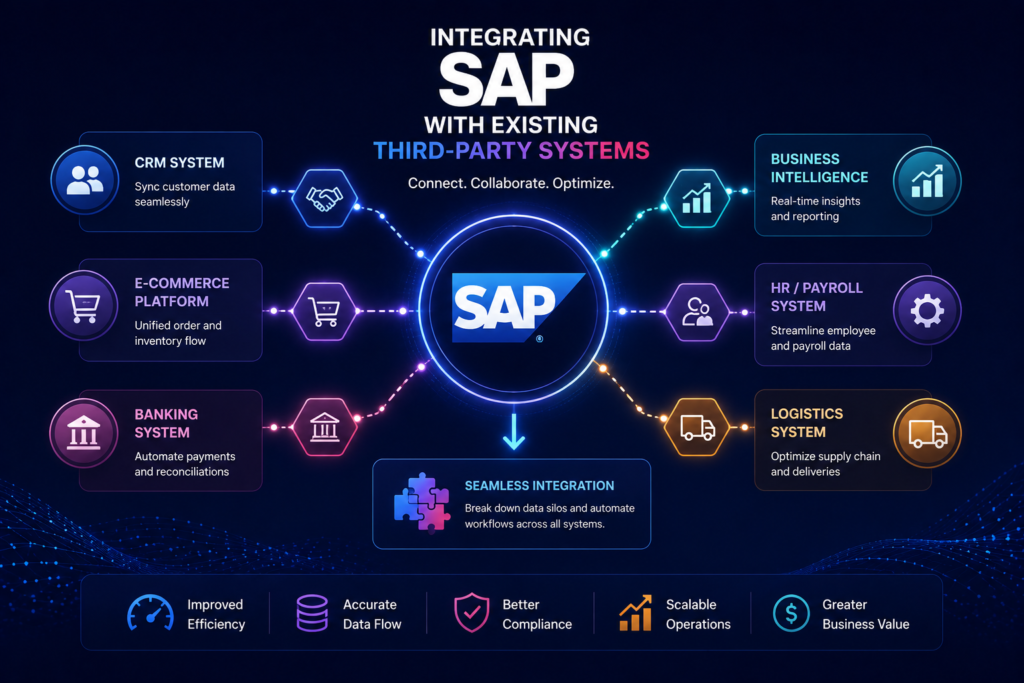
Today’s businesses often use more than one software platform. Connecting your new ERP with old tools or special apps is key for a unified digital space. This keeps your SAP infrastructure strong, avoiding data silos and ensuring smooth info flow.
The table below shows the differences between standard setup and custom development:
| Approach | Primary Benefit | Maintenance Effort | Flexibility |
| Standard Configuration | System Stability | Low | Moderate |
| Custom Development | Unique Workflow Fit | High | Very High |
| API Integration | Unified Ecosystem | Medium | High |
Good integration needs strong middleware and secure data. By linking your tools to the core system, you give your team real-time insights. Strategic planning here reduces technical debt and boosts your digital investment’s value.
Testing and Quality Assurance
Rigorous testing is the last step in your digital journey. It checks if all SAP modules work right before they’re used every day. Finding problems early helps avoid big issues later.
Executing Unit and Integration Testing
Unit testing looks at each small part of your system. It makes sure each part works alone. Then, integration testing checks how these parts talk to each other.
This is key to making sure data moves well across your whole system.
To get the best results, your team should do these things:
- Check each code piece and custom setup.
- Test how data moves through the whole system.
- Write down every problem found to fix it fast.
Conducting User Acceptance Testing (UAT)
User Acceptance Testing (UAT) focuses on how users will use the system. Real users try it out to see if it works for them. Success depends on your team’s help who know your business well.
This table shows the main differences between these testing steps:
| Testing Phase | Primary Goal | Key Participants |
| Unit Testing | Component Accuracy | Technical Developers |
| Integration Testing | System Connectivity | IT Consultants |
| UAT | Business Readiness | End-Users |
By focusing on these tests, you make sure your SAP modules work well for you. This careful planning reduces risks and makes your team more confident before you start using it.
Change Management and Training
A successful ERP rollout depends more on your people than your software. While technical setup is key, change management is the real driver of success. Without a clear plan, even the best SAP system will face challenges in getting users on board.
Developing a Comprehensive Training Program
Training should be more than just software tutorials. Create a plan that focuses on job roles to help employees see how the new system changes their work. Personalized learning paths make staff feel ready and able to adapt.
Use a mix of digital tools and hands-on workshops to meet different learning needs. In India, training in various formats boosts engagement. Consistent support during the learning phase keeps the momentum going.
Overcoming Resistance to Organizational Change
It’s normal for employees to feel uneasy about new processes. Create a culture of openness and clear communication. Leadership involvement is vital, as managers must promote the new system’s benefits.
Start by addressing concerns and showing how the system makes work easier and cuts down errors. When team members see how it helps them, they’re more likely to support the change. Proactive engagement turns doubters into supporters, helping your organization succeed in its new digital setup.
Go-Live Preparation and Execution
The big moment is here. You’re moving from legacy systems to a new digital core. This is the end of months of hard work and planning. Success means following a detailed plan without stopping business.
Developing a Cutover Plan
A good cutover plan is your guide for the final move. It lists all steps to switch to the new SAP platform. Clear communication channels are key to keep everyone on the same page.
It’s also important to have a reliable rollback strategy. This plan helps if technical problems come up. It lets your team quickly go back to the old system. This keeps your business safe from long outages.
Managing the Transition from Legacy Systems
The last step of data migration needs to be perfect. Your team must check all data is correct before going live. This step stops errors that could mess up daily work.
Changing from legacy systems is more than tech work. You also need to watch how the system works and how users like it. A structured plan helps your whole team make a smooth change.
| Strategy Type | Risk Level | Implementation Speed |
| Big Bang | High | Fast |
| Phased Rollout | Moderate | Gradual |
| Parallel Run | Low | Slow |
Doing data migration right is key to growing your business. By following these steps, your business in India can use SAP’s power confidently.
Post-Implementation Support and Optimization
The journey to digital transformation doesn’t stop when the system is live. Effective project management means focusing on long-term stability and excellence.
Establishing a Help Desk and Support Structure
A strong support system is key for business continuity in India. Companies should set up a tiered help desk system. This system sorts technical issues by complexity and impact.
Basic user questions go to level one support. Complex issues get special consultants. Clear communication channels help employees get help fast. This keeps work going without pause.
Monitoring System Performance and User Adoption
Improvement comes from tracking key performance indicators. IT teams look at system logs and response times. This helps find and fix problems before they cause trouble.
High user adoption shows a successful ERP rollout. Managers should check in with staff regularly. This helps understand how well the new system is working.
This approach helps leaders improve workflows and offer better training. Project management during this time ensures the SAP investment pays off in the long run.
Addressing Common Challenges in the Indian Context
Using SAP in the Indian business landscape needs a smart plan. You must meet global standards and local needs for success. Proactive planning is key to avoiding problems during setup.
Navigating GST and Local Statutory Compliance
Getting GST compliance right is vital for ERP projects in India. The tax system is complex. Your system must be flexible and ready for audits always. Keeping tax codes up to date is important for correct financial reports.
Here are steps to keep up with rules:
- Automate tax calculations to cut down on mistakes in invoices.
- Use tools for real-time checks on input tax credits.
- Do regular checks to make sure data matches official filings.
Managing Infrastructure and Connectivity Constraints
Managing SAP infrastructure well is key, given India’s digital gaps. Cities have fast internet, but rural areas face network issues. Building a strong system keeps it running smoothly everywhere.
Here are tips for a better setup:
| Challenge Area | Primary Risk | Mitigation Strategy |
| Network Latency | Slow system response | Deploy local edge caching |
| Power Stability | Hardware downtime | Use redundant power backups |
| Data Syncing | Information silos | Implement offline-first modules |
| Bandwidth Limits | High operational cost | Optimize data packet sizes |
Fixing these issues early sets a strong base for growth. Keep an eye on things and use local knowledge to tackle India’s unique challenges confidently.
Conclusion
Getting better at running your business means always changing and growing. A good SAP setup is key for your future success and staying ahead in the market.
Digital change is not just about new software. It’s about creating a culture that welcomes new ways of working. Your team needs to be ready to change to get the most out of SAP.
Managing change well is essential. When your team sees the value of the new system, they use it more and work better. Keep them updated and informed.
Following local laws, like GST, helps avoid big problems. Regular checks and updates keep your business running smoothly and legally. These steps help your business stay strong in a quick-changing world.
Your SAP journey is just starting. See SAP as a tool that grows with your business. Talk to others or your SAP team to find ways to improve your setup.