
Modern businesses in India are at a turning point. They must leave behind old ways and embrace digital transformation. A modern Enterprise resource planning system is key to this change.
By combining different workflows into one system, companies get a clear view of their operations. A smart Cloud-Based ERP plan helps them stay quick in today’s fast market. It also keeps their systems growing and safe.
Getting an ERP implementation right is more than just new software. It needs a solid plan. This guide helps leaders through the tough parts of updating their systems. By following these steps, you lay the groundwork for lasting success and top-notch operations.
Key Takeaways
- Modernizing technology is essential for scaling businesses in the Indian market.
- A unified digital ecosystem eliminates data silos and improves decision-making.
- Strategic planning serves as the foundation for successful system adoption.
- Cloud-based solutions offer the flexibility required for modern enterprise growth.
- Professional implementation ensures your infrastructure supports future business needs.
Understanding the Shift to Cloud-Based ERP
Companies in India are moving to the cloud fast. This change is key for better operations and efficiency. Cloud-Based ERP lets them leave old systems behind.
Why Indian Businesses are Migrating to the Cloud
They need to be quick in a fast market. Digital transformation India is now a must for staying ahead. Old software holds back growth by keeping data in silos.
SaaS ERP benefits include saving money upfront. No need for big server costs. This lets companies focus on new ideas, not just keeping systems running.
Also, Indian business software lets teams access data anytime, anywhere. This is key for teams working from different places. Growing companies can easily add more users or features.
Key Differences Between On-Premise and Cloud ERP
Knowing the differences between these models is important. The table below shows the main differences that affect Digital transformation India.
| Feature | On-Premise ERP | Cloud-Based ERP |
| Deployment | Local Servers | Internet-Based |
| Cost Structure | High Upfront | Subscription Fees |
| Maintenance | Internal IT Team | Vendor Managed |
| Scalability | Limited/Slow | Instant/Flexible |
Choosing the right Indian business software means knowing these differences. On-premise systems give control but are slow for today’s needs. SaaS ERP benefits make your company lean, secure, and ready for the future.
Assessing Your Business Readiness and Requirements
Starting a ERP implementation is more than just coding. You need to check your current workflows first. This step is key to a successful digital change.
Identifying Current Operational Bottlenecks
Many Indian businesses face slow growth due to hidden issues. These problems often come from manual data entry and poor communication between teams.
To boost operational efficiency, you must understand your current processes. Find out where things slow down. This helps pick the right system for your business.
- Manual reconciliation of financial records.
- Disconnected software tools that do not share data.
- Delayed reporting cycles that hinder management decisions.
Defining Core Functional Requirements
After finding your problems, list the key features you need to fix them. It’s easy to want everything, but focus on what’s essential.
Think about the SaaS ERP benefits that fit your industry. For example, automated tax compliance or tracking your supply chain in real-time. This way, you avoid getting too many features and stay within budget.
Setting Realistic Implementation Goals
A good cloud migration strategy needs clear goals. Instead of changing everything at once, do it in phases. This lets your team get used to the new system.
Legacy system modernization is big and takes time. Set goals you can reach to keep everyone moving forward. This helps your team feel supported during the change.
| Goal Category | Primary Focus | Expected Outcome |
| Process Speed | Automation | Reduced manual labor |
| Data Accuracy | Centralization | Single source of truth |
| Scalability | Cloud Infrastructure | Future-proof growth |
Building a Strategic Implementation Team
A successful digital transformation starts with your team. The quality and commitment of your team will decide if your ERP implementation succeeds. Without a dedicated team, even the best software won’t work well in your company.
Selecting Internal Stakeholders and Champions
You need to find people who know your business well. These champions connect management with the staff who use the system every day. Empowering them early ensures the project stays a priority for everyone.
Choose team members who are tech-savvy and good at talking to others. They will support the new system and help others adjust. This way, you build a strong foundation for long-term adoption.
Partnering with Experienced Cloud ERP Vendors
Finding the right partner is key. Good ERP vendor selection means choosing someone who knows India’s rules, like GST and local taxes.
A vendor with Indian market experience offers more than software. They share valuable insights on local business and help you avoid mistakes. Look for vendors who really get your industry and offer great support.
Defining Roles and Responsibilities
It’s important to clearly say who does what. Each team member needs to know their job and how it affects the timeline. This way, you avoid confusion and speed up the deployment.
- Project Manager: Keeps track of the timeline and makes sure goals are reached.
- Departmental Leads: Share feedback on what each department needs.
- IT Specialists: Handle the tech side and keep data safe.
- Executive Sponsors: Give big-picture advice and clear the way for the project.
Having clear roles stops confusion and keeps everyone on track. A structured approach to your ERP implementation means a smooth transition for your business.
Selecting the Right Cloud ERP Solution for Your Business
Choosing a Cloud-Based ERP is a big deal. You need to find one that fits your business well. Look for a system that works with your workflow, not against it.
Evaluating Top ERP Providers in the Indian Market
When picking an ERP vendor, focus on those who know Indian laws. The best Indian business software supports GST and local taxes. This saves time and avoids mistakes.
Choose vendors with a strong local team. They understand India’s market better. Reliable customer service is key when problems come up.
Comparing Subscription Models and Total Cost of Ownership
Understanding the ROI on ERP means looking at the Total Cost of Ownership (TCO). Don’t just look at the monthly fee. Consider setup, training, and data migration costs too. Clear pricing helps avoid surprise expenses.
Providers offer different plans based on users or features. Match these plans to your needs now and in the future. Careful financial planning keeps your system affordable as you grow.
Assessing Scalability and Integration Capabilities
Your business will change, so choose Scalable cloud solutions. A system that can’t grow will hold you back. Make sure it handles more users and data well.
Also, ERP system integration is key. Your new system should work with other tools smoothly. This gives you a unified view of your business data, helping you make better decisions.
| Selection Criteria | Priority Level | Key Benefit |
| Local Compliance | High | Reduces legal risk |
| Subscription Flexibility | Medium | Optimizes cash flow |
| API Connectivity | High | Ensures data flow |
| Vendor Support | High | Minimizes downtime |
Planning the Data Migration Strategy
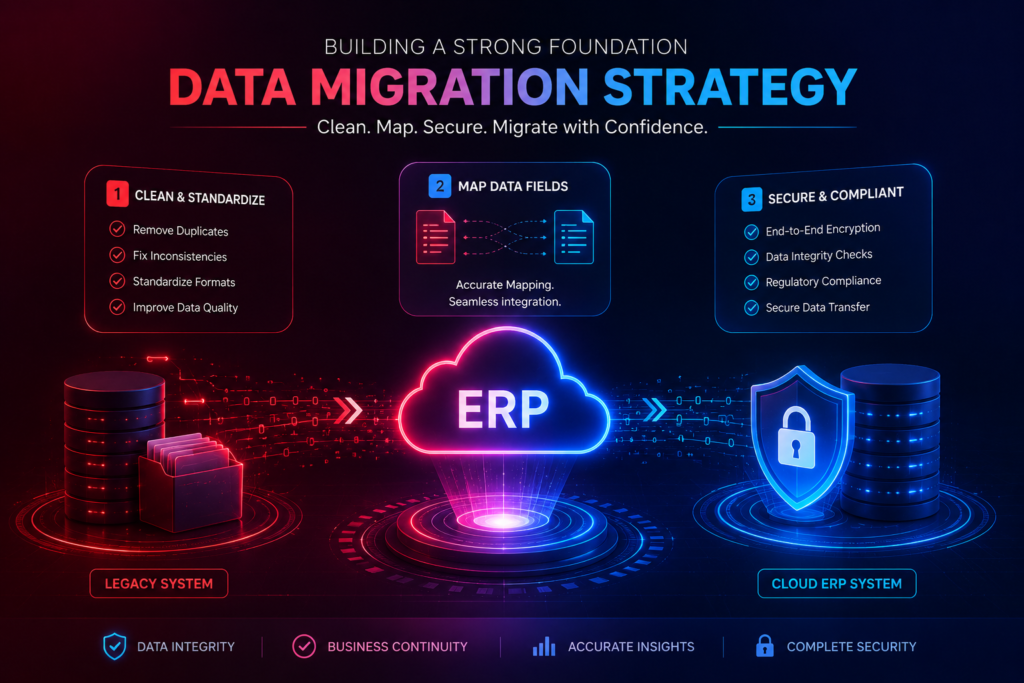
A successful move to a new digital space depends on your data quality. A good Cloud migration strategy is more than just moving files. It keeps your business insights accurate and useful.
Focus on data integrity from the start to avoid common problems. This way, your team can start using the new system quickly.
Cleaning and Standardizing Legacy Data
First, clean up your current databases. Legacy system modernization starts with a detailed check. This finds data that’s no longer needed.
Standardizing data formats is also key. Make sure all data looks the same across departments. This helps your new ERP system work well from the start.
Mapping Data Fields to the New System
After cleaning, align your data with the new system. Data migration best practices mean making a detailed map. This links old data fields to their new places.
This mapping is important for keeping past data easy to access. It helps your team keep using valuable insights without trouble. Good planning here stops data mismatch problems.
Ensuring Data Security and Compliance During Transfer
Keeping your data safe during the move is a must. You need strong Cloud security compliance to protect sensitive data.
Here are some security steps to take:
- End-to-end encryption for all data in transit and at rest.
- Regular checks to make sure data wasn’t damaged during the move.
- Following local Indian data protection laws and industry standards.
Keeping these standards helps protect your company’s image. It makes sure your new system is a secure foundation for growth. A careful approach to security builds trust and prepares for a smooth launch.
Configuring the Cloud ERP Environment
Starting to change how you work begins with setting up your cloud ERP system right. First, you build the technical base. Then, you make the system fit your operational efficiency needs. This makes sure the software works for you, not the other way around.
Customizing Workflows to Match Business Processes
Good business process automation comes from matching your work flow to the digital setup. By tweaking workflows, you cut down on manual steps and errors. Every department, from buying to selling, should have automated steps for data flow.
Customizing lets you set up approval paths and task orders that match your company’s way of making decisions. This personal touch boosts productivity in your Indian business.
Setting Up User Roles and Access Permissions
Keeping your system cloud security compliant is key when setting it up. You need to control access tightly so employees only see what they need for their jobs. This keeps data safe and strengthens your security.
- Make clear roles based on job duties.
- Use the least privilege rule for all user accounts.
- Check access logs often to keep strict security standards.
Integrating Third-Party Applications and APIs
Today’s businesses often use many tools, so ERP system integration is vital. With strong APIs, you can link your ERP to other apps like CRM, payment systems, or logistics tools. This lets data move smoothly across your tech stack.
Smooth integration means no more manual data entry between systems. When your tools talk well together, your team gets a holistic view of how the business is doing. This helps them make quicker, smarter choices.
Managing Change and Employee Training
Getting new technology is just the start. The real challenge is getting your team ready for it. The software is the tool, but your team’s operational momentum is key to success. It’s all about the people as much as the tech.
Developing a Comprehensive Change Management Plan
Having a clear plan helps everyone understand the change. Change management strategies explain the benefits, like better data access. This makes staff feel part of the company’s growth.
Conducting Effective Training Sessions for Staff
Training can’t be one-size-fits-all. You need ERP training programs for all skill levels. Hands-on experience builds confidence, no matter the skill level.
Here are some tips for training:
- Create modules for specific roles.
- Use interactive workshops for active learning.
- Keep digital guides and tutorials available.
Customizing ERP training programs makes everyone feel ready. This leads to better productivity soon after the system is live.
Addressing Resistance to New Technology
It’s normal for staff to be unsure about new tech. Early change management strategies tackle concerns with empathy. When leaders listen and show the system’s value, resistance fades.
Strong communication is key to winning over skeptics. Celebrate small wins and show how the ERP makes tasks easier. This builds a culture that welcomes change.
Executing the Testing Phase
Testing is key to avoiding problems before your cloud ERP launches. Data migration best practices keep your data right. But, the system must work well in real life. This step helps avoid issues that could hurt your business in India.
Performing Unit and Integration Testing
First, check if each part works alone. Then, see how they talk to each other. This integration testing makes sure data moves smoothly between different parts.
- Verify individual module functionality.
- Check data flow between connected systems.
- Validate API responses for third-party tools.
Conducting User Acceptance Testing
User Acceptance Testing (UAT) lets your team try it out. They do real tasks to see if it works for them. This stage also includes ERP training programs to help them get used to it.
Empowering your team to test early helps them accept the change. When they see it solves their problems, they’re more likely to use it. This teamwork is key for success.
Identifying and Resolving System Bugs
Good ERP testing procedures help find and fix bugs before launch. Keep a detailed log of every problem found. This makes sure no big errors are missed.
| Testing Stage | Primary Goal | Key Stakeholder |
| Unit Testing | Module Accuracy | IT Developers |
| Integration Testing | System Connectivity | System Architects |
| User Acceptance | Operational Fit | End Users |
Fixing bugs early means your launch will be stable and reliable. A good testing phase lowers the chance of problems after launch. This focus on quality protects your investment and helps your team adjust smoothly.
Going Live and Post-Implementation Support
Switching to a live cloud platform is a big deal. It needs careful planning. This step is key to how well your team uses the new tech.
By matching your change management strategies with the tech setup, you make the transition smoother. This helps your whole team adjust better.
Choosing Between Phased and Big Bang Rollouts
Choosing how to launch your system is a big decision. It depends on your company’s size and how much risk you can take. A Big Bang launch switches everyone to the new system at once. It’s quick but risky.
A phased rollout introduces the system bit by bit. This lets you control it better and find problems easier.
| Strategy | Best For | Risk Level | Resource Need |
| Big Bang | Small Businesses | High | Low |
| Phased | Large Enterprises | Low | High |
| Hybrid | Mid-Market Firms | Moderate | Moderate |
Monitoring System Performance During Launch
After going live, watching the system closely is key. You need to track metrics in real-time. This helps spot problems fast.
Technical teams should look for any issues with transactions or user access. Quick identification of these problems stops small issues from getting bigger. Keeping the system up and running is critical in the first days.
Establishing a Support Desk for Ongoing Issues
Even with the best planning, users will have questions or run into problems. Having a dedicated support desk is essential. It provides post-implementation support to your team.
Your support team should be ready for anything, from password resets to complex questions. By documenting common issues, you make it easier for IT staff. Consistent support helps your team use the new tools well and gets the most out of your cloud investment.
Optimizing Performance and Scaling Your ERP
Your journey to digital excellence doesn’t stop when the system is live. Good post-implementation support is key to keeping the system running well. It keeps users happy and the system up to date with your team’s needs.
Reviewing Key Performance Indicators
Success needs clear goals and tracking. Look at specific numbers to see if your system is working as planned. This helps you see if the ROI on ERP is good and find ways to get better.
- System uptime and availability rates.
- User adoption and training completion percentages.
- Transaction processing speed and error rates.
- Cost savings from less manual work.
Leveraging Advanced Analytics for Business Insights
Today’s systems have tools to make data useful. These tools help you move faster in your digital transformation India plans. They show trends that can lead to new ways to automate your business.
Deep insights help leaders make smart choices, not just guess. Knowing what customers want or how to improve supply chains gives you an edge. This makes your company quick to adapt in a fast world.
Planning for Future Module Upgrades
A system that doesn’t grow with your business will soon struggle. Using scalable cloud solutions lets you add new parts as needed. This way, you don’t have to replace everything later.
Looking at your tech plan often keeps your system up to date. Planning for updates protects your investment and keeps your team using the latest tools. Continuous improvement is vital for success in today’s digital world.
Conclusion
Modernizing your business needs a clear plan and a focus on growth. A strong Enterprise resource planning system is key. It helps Indian companies make their workflows smoother and see what’s happening in every department in real time.
Success comes from matching technology with your business goals. Make sure your team knows how to use the new tools. This way, your upgrade becomes a source of new ideas.
Big names like SAP, Oracle, and Microsoft Dynamics have great platforms for you. The right partner makes moving to the cloud easier. Using these tools helps you make smart choices every day.
Start making your business more agile by checking your systems now. Talk about your cloud migration journey or get advice from experts. Your journey to being more digital begins with a smart move to a modern Enterprise resource planning system.