
Running a modern firm in India needs quick action and precise control. The erp sap business one solution brings all departments together in one place. It lets leaders see how things are going without using many tools.
With these advanced tools, local owners can easily watch over finance and supply chain data. This makes sure everyone has the right info to make smart choices. Having the right data cuts down on mistakes and saves time for staff.
These improvements help firms grow steadily by using resources better and serving clients better. Using such technology is key for local businesses to thrive globally. Investing in digital tools is a big step towards success.
Key Takeaways
- Centralise all main tasks in a single digital tool.
- See how your firm works with live reports and data.
- Control your stock and supply chain to save money.
- Grow your operations as the market changes and expands.
- Serve your customers better with helpful data tools.
- Stay right with local Indian tax and legal rules.
Understanding ERP SAP Business One: What It Is and How It Works
ERP SAP Business One solution has many features and functions. It’s a complete solution for growing companies.
Defining SAP Business One as an Integrated ERP Solution
SAP Business One is an integrated ERP solution. It brings together different business areas into one system. This makes it easy to handle finances, sales, customer relations, buying, and stock.
It gives real-time views of all business activities. This helps in making better decisions and running operations smoothly.
How SAP Business One Differs from SAP S/4HANA and Other Enterprise Solutions
SAP Business One and SAP S/4HANA are both ERP solutions from SAP. But they serve different needs. SAP Business One is for small to medium-sized businesses and is more affordable.
SAP S/4HANA is for big companies with complex needs. Here’s a table showing the main differences:
| Feature | SAP Business One | SAP S/4HANA |
| Target Market | Small to Medium-sized Businesses | Large Enterprises |
| Complexity | Less Complex, Easier to Implement | Highly Complex, Requires Significant Implementation Effort |
| Cost | More Cost-Effective | Higher Total Cost of Ownership |
The Architecture and Technology Behind the Platform
SAP Business One uses service-oriented architecture (SOA). This makes it flexible and scalable. It lets businesses change the system as they grow.
The platform also works with other apps and services. This makes it even more useful and powerful.
Core Features That Make ERP SAP Business One Stand Out
ERP SAP Business One is special because it has financial management, sales, and inventory control all in one. It’s made for growing companies to manage their work well.
Financial Management and Accounting Capabilities
SAP Business One has strong financial management tools. It helps with accounts payable, accounts receivable, and general ledger. This keeps financial records right and helps manage money well.
It also has financial reporting and budgeting. This lets companies watch their money and plan for the future.
Sales and Customer Relationship Management Tools
The sales and CRM tools in SAP Business One boost customer happiness and sales. The CRM module helps manage customer talks, track sales, and understand customer habits.
Features like sales forecasting and order management make sales smoother and customer service better.
Purchasing and Inventory Control Modules
SAP Business One’s purchasing and inventory modules improve buying and stock management. It automates buying, tracks stock live, and avoids too much or too little stock.
The inventory management also has warehouse management and inventory valuation. This gives a clear view of stock and its worth.
Production Planning and Manufacturing Features
For makers, SAP Business One has production planning and execution tools. It helps plan and manage making, track costs, and deliver on time.
The production planning tools include material requirements planning (MRP) and capacity planning. This optimises making and cuts costs.
Business Intelligence and Analytics Dashboard
SAP Business One’s business intelligence and analytics give real-time insights. The dashboard lets companies watch KPIs, analyse data, and make smart choices.
With reporting and data visualisation, businesses understand their work better and find ways to get better.
Key Benefits for Growing Companies in India
For growing companies in India, using an ERP system like SAP Business One is smart. It makes operations more efficient and visible. As businesses grow, managing operations, customers, and finances gets harder. SAP Business One helps by being a complete and connected ERP solution.
Scalability to Support Business Expansion
SAP Business One grows with your business. It has a design that lets you add more users, features, and modules as you expand. This means your ERP system stays valuable as your business gets bigger, handling more transactions and complex processes.
Key scalability features include:
- Easy addition of new users and roles
- Flexible module addition to support new business functions
- Scalable data storage to handle growing data volumes
Cost-Effectiveness Compared to Enterprise ERP Systems
SAP Business One is cheaper than big ERP systems like SAP S/4HANA. It has strong features but costs less, making it great for small and medium-sized enterprises (SMEs) in India.
The cost-effectiveness comes from:
- Lower initial investment and implementation costs
- Reduced maintenance and support costs
- Simplified upgrade processes
Compliance with Indian GST and Regulatory Requirements
SAP Business One meets many regulatory needs, including India’s Goods and Services Tax (GST). It helps with GST by automating tax calculations, reporting, and filing. This reduces the chance of not following rules and the penalties that come with it.
Key compliance features for Indian businesses include:
- Automated GST calculation and invoicing
- GST return filing and reporting
- Support for other local regulatory requirements
Real-Time Visibility Across All Business Operations
SAP Business One gives real-time views of your business. This helps you make better decisions. With its dashboard and reporting tools, you can see important KPIs, track sales and customer interactions, and check financials in real-time.
Benefits of real-time visibility include:
- Improved decision-making with up-to-date data
- Enhanced operational efficiency through timely interventions
- Better customer service through access to current information
How to Assess If SAP Business One Is Right for Your Organisation
Figuring out if SAP Business One fits your organisation takes careful thought. You need to look at several important points. This helps make sure the ERP system meets your needs and helps your business grow.
Identifying Your Business Size and Growth Trajectory
SAP Business One is made for small and medium-sized businesses. To see if it’s right for you, think about your business size and growth plans. Key things to consider are:
- The number of employees and departments using the system
- Your current income and how fast it’s growing
- The complexity of your business operations and processes
Evaluating Your Industry-Specific Requirements
Every industry has its own needs. SAP Business One has solutions for many sectors, like manufacturing and services. When looking at SAP Business One, think about:
- If the solution meets your industry’s needs
- The availability of modules and features for your sector
- If you need to customise the system for your industry
Analysing Your Current System Limitations
Looking at what your current system can’t do is key. Think about:
- The problems with your current system, like data being stuck in silos
- If your current system can grow with your business
- If your system works well with other important business apps
Calculating Total Cost of Ownership and Expected Returns
It’s important to know the total cost of ownership (TCO) and expected return on investment (ROI). Consider these:
- The cost of licenses and subscription fees
- What it costs to set up and train on the system
- Expenses for ongoing support and maintenance
- The benefits, like better efficiency and smarter decisions
By looking at these points carefully, you can decide if SAP Business One is right for you. This ensures a successful setup.
Step-by-Step Guide to Implementing ERP SAP Business One Successfully
Implementing SAP Business One needs careful steps. This guide helps businesses through the process.
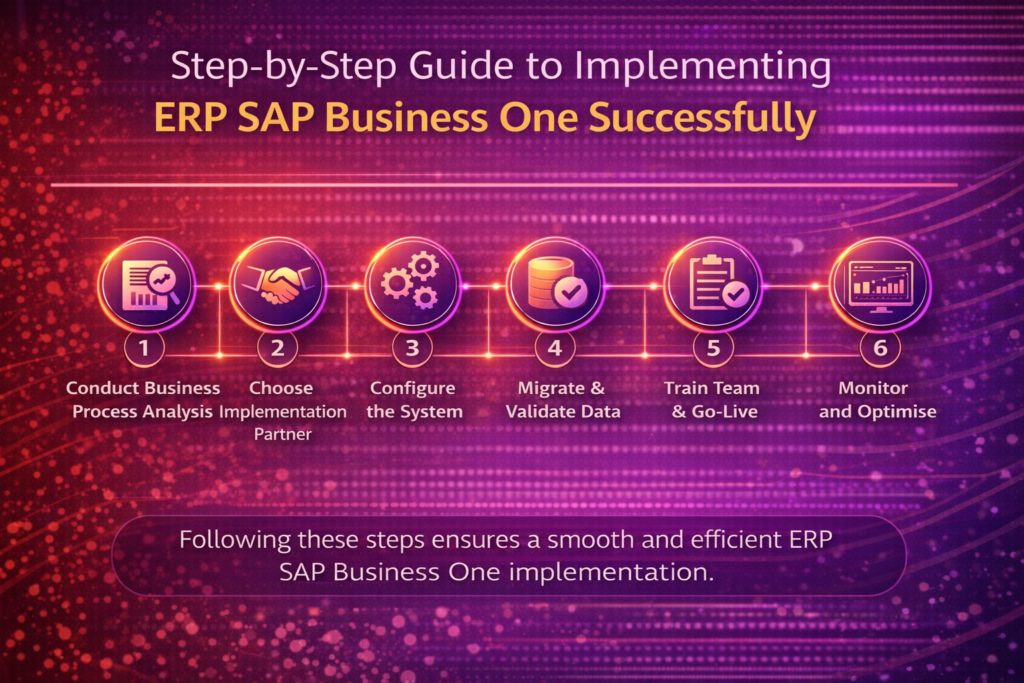
Conduct a Detailed Business Process Analysis
Start by looking at your current business processes. Find out what works and what doesn’t. See how SAP Business One can help.
Key activities include:
- Documenting current processes
- Identifying areas for improvement
- Defining future state processes
Choose the Right Implementation Partner in India
Finding the right partner is key. Look for someone with SAP Business One experience and a good track record.
Consider the following factors:
- Partner’s experience with SAP Business One
- Industry-specific knowledge
- Customer support and service offerings
Configure the System to Match Your Workflows
Now, tailor SAP Business One to your needs. This includes setting up modules and user roles.
Configuration tasks may involve:
- Setting up financial management parameters
- Configuring sales and purchasing processes
- Defining inventory management settings
Migrate and Validate Data from Legacy Systems
Move data from old systems to SAP Business One. Make sure the data is correct and complete.
Best practices include:
- Data cleansing and validation
- Testing migration processes
- Verifying data post-migration
Train Your Team and Execute Go-Live Strategy
Training is essential. Make sure your team knows how to use SAP Business One. Plan a smooth go-live.
Training should cover:
- System functionality
- Business processes
- Best practices for using the system
Monitor Performance and Optimise Post-Implementation
Keep an eye on how the system is working. Look for ways to improve and meet your needs.
Ongoing activities include:
- Monitoring system performance
- Gathering user feedback
- Identifying opportunities for optimisation
Industry-Specific Applications and Modules
SAP Business One is great because it fits many industries. It has lots of applications and modules. This makes it perfect for different businesses, like manufacturing, wholesale, professional services, and retail.
Manufacturing and Production Businesses
Manufacturing businesses get a lot from SAP Business One. It has production planning, bill of materials, and production scheduling. This helps make production smoother and more efficient.
The system also supports make-to-order and make-to-stock production strategies. This lets manufacturers meet customer needs better and manage their stock well.
| Feature | Description | Benefit |
| Production Planning | Allows for the planning and scheduling of production | Improved production efficiency and reduced lead times |
| Bill of Materials | Manages the list of materials required for production | Accurate inventory management and reduced waste |
| Production Scheduling | Enables the scheduling of production based on resource availability | Optimised resource utilisation and increased productivity |
Wholesale and Distribution Companies
Wholesale and distribution companies get a lot from SAP Business One. It has inventory management and distribution capabilities. This lets them track inventory in real-time across many warehouses.
It also has advanced pricing and discounting rules. This helps them manage complex pricing strategies well. It makes them more competitive.
Professional Services and Project-Based Organisations
Professional services and project-based organisations benefit from SAP Business One. It has project management and service management capabilities. This helps manage projects from start to finish.
The system also has time and expense tracking. This lets professionals track their time and expenses accurately. It helps with billing and cost management.
Retail and E-commerce Enterprises
Retail and e-commerce businesses can use SAP Business One well. It has e-commerce integration and retail management features. This helps manage online and offline sales channels together.
It also has advanced analytics and reporting. This gives retailers insights into customer behaviour and sales trends. It helps them make better decisions.
Integration Capabilities with Third-Party Applications
SAP Business One offers great integration with other apps. This makes it easy for businesses to add special tools to their system. It helps them get a solution that fits their needs perfectly.
E-commerce Platform Integration (Shopify, WooCommerce, Magento)
SAP Business One works well with e-commerce sites like Shopify, WooCommerce, and Magento. It lets businesses link their online shops with their ERP system. This makes things easier in many ways.
- Automated data exchange between the e-commerce platform and SAP Business One
- Real-time inventory updates to prevent overselling
- Consistent pricing and product information across all sales channels
- Streamlined order management and fulfilment processes
Banking and Payment Gateway Connectivity
Connecting SAP Business One with banks and payment gateways makes money moves smoother. It helps with:
- Direct bank statement uploads for easier reconciliation
- Automated payment processing to reduce manual errors
- Enhanced security through secure payment gateways
- Improved cash flow forecasting with real-time transaction data
GST and Tax Compliance Tools for Indian Businesses
For Indian businesses, SAP Business One has tools for GST and tax. It helps with:
- Automated GST filing and return processing
- Compliance with Indian tax regulations and laws
- E-way bill generation and management
- Simplified tax invoicing and reporting
Business Intelligence Solutions (Power BI, Tableau)
SAP Business One also works with tools like Power BI and Tableau. This gives businesses better analytics and reports. It helps with:
- Data-driven decision-making with real-time insights
- Customisable dashboards for different user roles
- Advanced data visualisation and reporting
- Enhanced business performance monitoring and analysis
Pricing Models and Return on Investment Considerations
Businesses in India need to understand SAP Business One’s pricing and ROI. This is key to choosing the right ERP solution. It helps match the system with their budget and needs.
Licensing Options: Professional vs Limited Users
SAP Business One has flexible licenses for different needs. There are two main types: Professional and Limited Users.
- Professional Users get full access to SAP Business One. They are best for those needing all system features.
- Limited Users have less access. This is good for those doing specific tasks without needing everything.
| User Type | Access Level | Suitable For |
| Professional | Full access | Employees needing all system access |
| Limited | Restricted access | Employees with specific, limited system needs |
Cloud vs On-Premise Deployment Costs
The choice of deployment model affects costs. SAP Business One can be on-premise or in the cloud.
On-Premise Deployment costs more upfront. You need hardware and infrastructure. But, you have more control over data and customisations.
Cloud Deployment is cheaper upfront. It doesn’t need on-premise infrastructure. It’s also scalable and flexible.
Hidden Costs to Factor Into Your Budget
There are hidden costs beyond the initial costs. These can change the total cost of ownership.
- Customisation and Integration: Making SAP Business One fit your needs can cost extra.
- Training and Support: It’s important to train and support employees well for a smooth implementation.
- Data Migration: Moving data from old systems to SAP Business One can be complex and expensive.
Calculating Expected ROI for Indian Growing Businesses
To figure out ROI, consider how SAP Business One can improve your business. Look at increased efficiency, lower costs, and better decision-making.
- Identify Current Pain Points: Find areas where SAP Business One can help.
- Quantify Benefits: Guess the financial gains from better efficiency, lower costs, and smarter decisions.
- Compare with Costs: Match the benefits against the total cost of ownership.
By looking at these points, Indian businesses can decide wisely on SAP Business One. This ensures it fits their growth plans and budget.
Comparing SAP Business One with Alternative ERP Solutions
Choosing the right ERP system is key for business success. This section compares SAP Business One with other top choices. Knowing the strengths and weaknesses of different ERP solutions is vital for managing operations well.
SAP Business One vs Microsoft Dynamics 365 Business Central
SAP Business One and Microsoft Dynamics 365 Business Central are for small to medium-sized businesses. SAP Business One is easy to set up and has strong financial management. Microsoft Dynamics 365 Business Central works well with Microsoft products like Office 365, improving teamwork and productivity.
Here are the main differences:
- Integration capabilities: Microsoft Dynamics 365 Business Central is great with Microsoft Office. SAP Business One has many third-party integrations.
- Scalability: Both can grow, but SAP Business One is more flexible for growing businesses.
- Cost: The cost of both can vary. SAP Business One is often cheaper for SAP users.
SAP Business One vs Oracle NetSuite
Oracle NetSuite is for larger SMEs and big companies’ subsidiaries. It has more features than SAP Business One, like for e-commerce and finance.
Consider these points:
- Cloud readiness: Oracle NetSuite is cloud-based. SAP Business One can be on-premise or cloud.
- Global capabilities: Oracle NetSuite is great for global businesses.
- Customisation: SAP Business One is easy to customise for your business.
SAP Business One vs Tally ERP and Zoho Books
Tally ERP and Zoho Books are favourites in India for SMEs. They handle accounting and finance well. They are simpler and cheaper than SAP Business One.
But SAP Business One has:
- Broad functional scope: It does more than accounting, like sales and inventory.
- Scalability and growth support: SAP Business One grows with your business, adding features as needed.
- Integration with other SAP solutions: It works well with other SAP products for businesses already using them.
Why SAP Business One Offers Superior Value for Mid-Sized Enterprises
SAP Business One is great for mid-sized businesses. It has the right mix of features, growth support, and cost. It fits a wide range of business needs and grows with your company.
Key benefits include:
- Comprehensive ERP functionality
- Flexibility in deployment options (cloud or on-premise)
- Strong support for business growth and expansion
By looking at SAP Business One against other ERPs, businesses can choose wisely. This choice should match their goals and needs.
Common Implementation Challenges and How to Overcome Them
Getting SAP Business One to work well needs to tackle many common problems. Setting up an ERP system like SAP Business One is big. It involves many people and changes a lot in an organisation.
Managing Change Resistance Among Employees
One big challenge is getting employees to accept the change. A good plan for managing change is key. This plan should include:
- Telling everyone why SAP Business One is good and what it will do for them
- Training to help employees learn new skills
- Letting employees help with the change to make them feel part of it
By focusing on the people side of change, you can make the transition smoother.
Ensuring Data Accuracy and Integrity During Migration
Moving data to SAP Business One is very important. Making sure the data is right and complete is key to avoid problems. Here’s how to do it well:
- Check the data first to get rid of any bad or old information
- Make a plan for moving the data that includes checking it
- Test the data to make sure it’s correct and complete
By following these steps, you can make sure your data is good to go for the new system.
Balancing Customisation with Standard Functionality
SAP Business One has many standard features that meet many needs. But, some organisations need special features. Finding the right balance is important to keep things simple and easy to manage.
To find this balance, you should:
- Figure out what your main business tasks are and see if SAP Business One can handle them
- Only add special features if they are really needed
- Make sure any special features work well and are documented
Planning for Post-Implementation Support and Continuous Improvement
Support after setting up SAP Business One is very important for its success. To make sure it keeps working well, plan for ongoing support by:
- Having a team ready to help with any problems
- Setting up ways to deal with questions and fix issues
- Always checking how the system is doing and finding ways to make it better
By planning for support and improvement, you can get the most out of SAP Business One and reach your business goals.
Maximising Your SAP Business One Investment for Long-Term Success
To succeed with SAP Business One, focus on good implementation and keeping it running well. This means planning well, watching progress, and always looking to get better.
Establishing Clear Implementation Goals and KPIs
It’s key to set clear goals and KPIs for SAP Business One success. This makes sure everyone knows what’s expected.
- Make specific, measurable goals that match your business plan.
- Use KPIs to check how you’re doing and find ways to get better.
- Keep checking and changing your goals and KPIs as your business grows.
Maintaining Executive Sponsorship Throughout the Journey
Having a sponsor from the top is critical for SAP Business One success. It means the project gets the support and resources it needs.
Key aspects of executive sponsorship include:
- Being actively involved in planning and making decisions.
- Telling everyone why the project is important.
- Making sure the team has what they need and enough money.
Implementing Continuous User Training Programmes
Training users all the time is key to getting the most from SAP Business One. It makes sure users know how to use the system well.
Good training should include:
- Starting with a full training for all users.
- Keeping training going to cover new things and user needs.
- Listening to feedback to make training better.
Leveraging Advanced Analytics for Strategic Decision-Making
SAP Business One has advanced analytics that help with making smart decisions. These tools give deeper insights into how your business works, helping you make better choices.
Benefits of advanced analytics include:
| Benefit | Description |
| Improved forecasting | Being able to guess future trends and results better. |
| Data-driven decisions | Being able to make choices based on current, accurate data. |
| Operational efficiency | Finding ways to make business processes better. |
Conclusion
SAP Business One is a top choice for growing companies. It offers tools for managing finances, sales, and inventory all in one place. This ERP solution helps businesses make better decisions. It makes operations more efficient and boosts growth. In India, SAP Business One is great for growing companies. It’s affordable and meets GST rules.
Its easy-to-use design and advanced features make it perfect for businesses. It helps them run better and succeed in the long run. Choosing the right ERP system is key in today’s fast-changing business world.
SAP Business One is a smart choice for growing companies. It gives them the tools to stay ahead and grow sustainably. Using SAP Business One helps businesses get ready for success. It sets them up for future growth.
Read this related blog: SAP Business One Software: The Complete ERP Solution for Growing Businesses for more detailed insights.