
Small and medium enterprises in India face a fast-changing business world. Digital transformation is now key for growth. This guide looks at how ERP solutions help growing businesses. It covers how to make operations smoother, see data better, and make smart decisions.
The article dives into SAP One Business ERP for SMEs. It’s perfect for those starting or looking to improve their systems. This guide is full of useful tips for your digital journey.
Key Takeaways
- Integrated ERP systems help SMEs centralise data and automate repetitive tasks
- Cloud-based solutions reduce upfront costs and provide flexibility for growing businesses
- Real-time analytics enable better decision-making and improved operational efficiency
- Indian organisations benefit from localised support and regulatory compliance features
- Scalable platforms grow alongside your business without requiring complete system replacements
- Successful implementation depends on proper planning, staff training, and change management
Why Indian SMEs Need SAP One Business for Digital Transformation
India’s small and medium enterprises face a big challenge. With over 63 million SMEs, they make up nearly 30% of the country’s GDP. Yet, many use old systems and struggle to see their operations clearly.
Digital transformation is now key for survival. Solutions like SAP One Business help these companies grow.
The Current State of ERP Adoption in Indian SMEs
ERP adoption in Indian SMEs is mixed. Big companies use advanced systems, but small ones face cost and complexity issues. Only about 20% of SMEs use ERP software, with most using spreadsheets or basic tools.
This gap leads to big problems. Owners spend hours trying to match data and make accurate reports. They miss out on important insights for better decisions.
Manual processes are hard to scale as businesses grow. Also, meeting GST and regulatory needs is tough without better tracking.
But, things are changing. Cloud solutions and affordable ERP options are now available. Indian SMEs see digital transformation as possible for them too.
How SAP One Business Addresses SME-Specific Challenges
SAP made One Business for Indian SMEs. It bridges the gap between big systems and small business needs.
One big challenge is limited IT resources. SAP One Business has simple interfaces and support to help. This lets staff focus on their main tasks.
Cost is another issue. SAP One Business has flexible pricing to fit SME budgets. It’s affordable and offers clear benefits, making digital transformation possible.
Scalability is key for growing businesses. SAP One Business adapts as businesses grow. It supports expansion without needing expensive upgrades.
The Business Case for Integrated ERP Systems
ERP systems offer more than just convenience. Indian SMEs that adopt solutions like SAP One Business see big improvements. These benefits make investing in technology worth it.
One big advantage is better efficiency. Unified systems reduce data entry, errors, and time. Staff can focus on adding value, saving costs and handling more work.
Decision-making gets better too. Real-time data helps leaders spot trends and make quick decisions. This is key for analysing customer patterns and improving finances.
Customer satisfaction also improves. Faster service and accurate delivery build loyalty. This leads to more business and positive word-of-mouth.
The benefits add up to a strong case for SAP One Business. While it costs to implement, the savings and growth make it worthwhile. For Indian SMEs, it’s a strategic investment in their future.
Understanding SAP One Business: Core Modules and Architecture
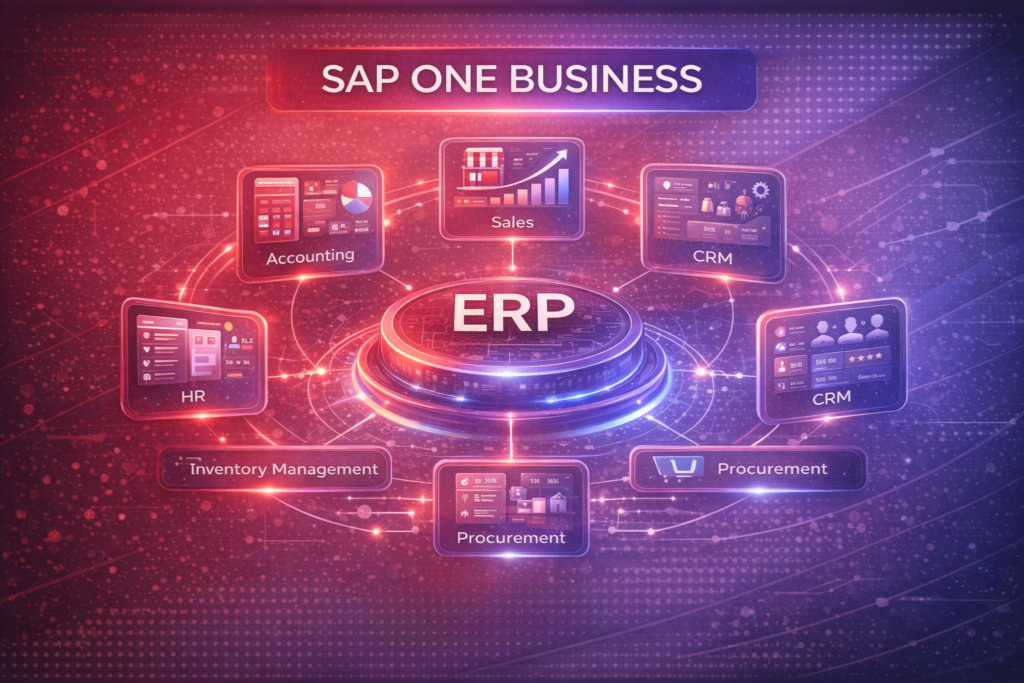
SAP One Business has many modules that work together. They help with finance, sales, and more. This makes it easier for Indian SMEs to manage their business.
It’s different from other software because it’s all in one place. This means information moves easily between departments. It’s great for growing businesses in India because it’s easy to scale.
What Is SAP One Business and How Does It Differ from SAP Business One
SAP One Business is for mid-market companies and bigger SMEs. It has more features than SAP Business One, which is for smaller businesses. Knowing the difference helps Indian business owners choose the right one for them.
SAP One Business is better for companies that need more. It’s good for businesses that need to support many locations or have complex manufacturing. It’s also great for financial reporting.
It also offers more flexibility in how you use it. This is good for Indian SMEs in regulated industries. You can choose to use it in the cloud or on your own servers.
Financial Management and Accounting Module
The financial module is key for SAP One Business. It helps with accounting, reporting, and following rules. It handles things like accounts payable and fixed assets.
It’s great for Indian SMEs because it makes following rules easier. It helps with taxes and other rules. It also makes sure you don’t make mistakes that could cost you money.
It lets you see your finances in real-time. This is useful for keeping track of money and making smart decisions. It also supports international trade by handling different currencies.
Sales and Customer Relationship Management
The sales and CRM part of SAP One Business is powerful. It helps Indian SMEs manage their customer relationships. It tracks everything from the first contact to after-sales service.
It has tools for managing contacts, tracking opportunities, and creating orders. It keeps a record of all customer interactions. This helps build strong relationships with customers.
It also helps with after-sales service. It tracks warranties and handles customer feedback. This builds a good reputation and encourages customers to come back.
Purchasing and Inventory Control
Good procurement and inventory management are key for Indian SMEs. The purchasing module in SAP One Business makes this easier. It helps keep inventory levels right and saves money.
It tracks stock and suggests when to order more. This is useful for businesses with complex supply chains. It also helps with tracking batches and managing expiry dates.
It helps evaluate suppliers and negotiate better deals. It keeps detailed records of suppliers. This helps businesses work better with their suppliers and save money.
Production and Operations Management
The production module is vital for manufacturing businesses. It helps plan, schedule, and execute production. It supports different production models common in India.
It has tools for managing resources and tracking jobs. It helps with planning and tracking production. This improves delivery times and reduces waste.
It also helps with quality control. It tracks quality from start to finish. This ensures products meet high standards.
The following table summarises the core modules and their primary benefits for Indian SMEs:
| Module | Key Functions | Indian Business Benefits | GST/Compliance Features |
| Financial Management | General ledger, accounts payable/receivable, fixed assets, reporting | Automated tax calculations, real-time financial visibility, multi-currency support | GST input/output tracking, e-way bill integration, statutory filings |
| Sales and CRM | Lead management, opportunity tracking, order processing, service management | Improved customer satisfaction, streamlined sales cycles, better forecasting | GST-compliant invoicing, customer tax classification |
| Purchasing and Inventory | Procurement automation, stock management, supplier evaluation | Reduced inventory costs, optimised purchasing, supplier performance insights | GST-compliant purchase entries, input tax credit tracking |
| Production and Operations | Production planning, quality control, job tracking, capacity management | Improved delivery performance, accurate costing, quality documentation | Bill of materials GST calculation, production tax reporting |
Understanding these modules helps Indian business leaders see how SAP One Business meets their needs. It’s all connected, which means data moves smoothly between departments. This avoids the problems that come with separate systems.
When looking at SAP One Business, Indian SMEs should think about now and the future. The system can start with the basics and add more as needed. This makes it easier to grow without getting overwhelmed.
Key Features That Make SAP One Business Ideal for Growing Companies
Growing Indian companies need an ERP solution that keeps up with their needs. SAP One Business does this with its strong features. It uses modern tech and practical tools to help businesses grow efficiently.
This system helps SMEs in India manage teams and taxes. It’s designed to meet the unique challenges of Indian businesses.
Cloud-Based Accessibility and Mobile Support
SAP One Business is cloud-based, which means no big upfront IT costs. You can access your data from anywhere with internet. This is great for companies with many branches or remote workers.
The mobile support lets teams work from anywhere. You can check inventory, approve orders, or review reports on your phone. This means you can make decisions quickly, no matter where you are.
Being cloud-based also means automatic updates and security. This is a big help for companies without a lot of IT staff. The system grows with your business, adding new users and features easily.
Real-Time Reporting and Analytics Capabilities
Today, making decisions based on data is key for businesses. SAP One Business has powerful analytics tools. It turns data into useful insights with customisable dashboards.
You can track sales, inventory, customer behaviour, and finances all in one place. The system makes reports automatically, saving time. You can get reports whenever you need them.
Advanced users can dig deep into data. This helps find patterns and trends. For example, you might find out which products are most profitable or which customers are likely to return.
Multi-Currency and GST Compliance for Indian Businesses
Indian businesses dealing with international trade face special challenges. SAP One Business handles multi-currency transactions easily. It converts amounts using current rates, making bookkeeping simpler and reducing errors.
The Goods and Services Tax (GST) has changed tax management in India. SAP One Business has GST features that automate tax calculations. It generates accurate GST returns and handles input tax credits.
The system manages transactions across states properly. It tracks Input Tax Credit and ensures timely returns. This reduces the burden of compliance and minimises penalties.
Scalability and Customisation Options
As your business grows, your ERP system needs to too. SAP One Business is designed to scale. You can add new modules and configure workflows as needed.
The system can be customised for your industry and preferences. You can add custom fields, reports, or workflows. This ensures the system grows with your business, not holding it back.
The platform also integrates with other apps and systems. This creates a unified data environment. It eliminates duplicate data entry and ensures information consistency.
These features make SAP One Business a great choice for Indian SMEs. It meets current needs and prepares for future growth and innovation.
How to Assess Your Business Readiness for SAP One Business Implementation
Indian SMEs can check if SAP One Business is right for them with a readiness assessment. This step ensures you’re ready to get the most from your investment. It helps avoid mistakes and sets the right expectations for the journey ahead.
Before starting, focus on four key areas. These areas are the base for a successful SAP One Business implementation. They help spot challenges early, so you can fix them before starting.
Step 1: Conducting a Business Process Audit
Start by mapping all your business processes. Document how information moves between departments. This includes sales, purchasing, finance, and operations.
Look at each workflow closely. Note how long tasks take. Find out which processes work well and which need work. Pay attention to data transfers and manual records.
For small businesses in India, consider your industry’s needs. Manufacturing and trading have different needs. Service businesses have their own workflow patterns.
Step 2: Identifying Pain Points and Inefficiencies
After documenting your processes, find the problems that need fixing. These are the issues SAP One SME solutions should solve. Problems include slow financial reports, inventory mistakes, and poor customer service.
Make a list of problems, from most urgent to least. Consider how each problem affects your business. This helps your team focus on the most important issues.
Get input from different departments. Employees know the daily problems. Their feedback helps you understand real challenges. Document examples and try to quantify the cost of each problem.
Step 3: Defining Clear Objectives and Success Metrics
With problems identified, set clear goals for SAP One Business. Goals should be specific, measurable, achievable, relevant, and time-bound. Vague goals are hard to track.
Set goals like reducing inventory costs or improving order accuracy. Each goal should have a clear target. For example, aim to cut inventory costs by 15% in a year.
Success metrics show the value of your ERP investment. Decide who will track these metrics and how often. Make sure key people know these targets and will track progress.
Step 4: Evaluating Your IT Infrastructure and Resources
Lastly, check your IT setup and resources. Look at your hardware, network, and internet. SAP One Business needs reliable internet for best performance.
See if you have staff for basic system management. If not, plan for external help or managed services. Knowing your support needs helps with budgeting and choosing partners.
Also, check your data quality. Bad data can ruin ERP implementations. Clean or standardise data before moving to your new system. This reduces risks and makes the transition smoother.
| Readiness Area | Key Questions to Answer | Resources Needed |
| Business Processes | Are all workflows documented? Do gaps exist in current processes? | Process documentation tools, department heads, workflow analysts |
| Pain Points | What are the top 5 business problems? What is the cost of each issue? | Employee interviews, performance data, cost analysis reports |
| Objectives | Are goals SMART? Can success be measured objectively? | Strategic planning sessions, baseline metrics, target benchmarks |
| IT Infrastructure | Is hardware adequate? Is network connectivity reliable? | IT assessment tools, technical audit, infrastructure upgrades |
By following these four steps, you’ll know if your business is ready for SAP One Business. This knowledge helps plan your implementation and sets realistic goals. Businesses that prepare well usually have smoother and more successful ERP deployments.
Step-by-Step Guide to Implementing SAP One Business in Your Organisation
Changing your business needs more than just installing software. It needs a good plan for change. For Indian SMEs, a clear plan helps adopt new systems smoothly. This guide will help you through each step, from choosing a partner to getting support after.
Step 1: Selecting the Right Implementation Partner
Finding the right partner is key. They should know your business and have the skills to help. Look for those with experience in the SME sector and success stories in India.
Choose a partner who gets the challenges of Indian SMEs. They should offer help with setting up, moving data, and keeping the system running. Ask for examples and references to check their claims.
Check their support and how fast they respond. A partner ready to help 24/7 is very helpful. See if they can train your team and if they offer support after setup. Choosing a partner is a big decision that affects your business for a long time.
Step 2: Planning Your Implementation Timeline and Milestones
Good planning is key to a successful setup. Most SME setups take three to six months. Break it down into phases with clear goals and how to know if you’ve met them.
The first phase is about what you need and how to set it up, lasting four to six weeks. The second phase is setting up the system, taking eight to twelve weeks. The third phase is moving data, testing, and training, lasting six to eight weeks. The last phase is getting ready for the system to go live and setting up support.
Make sure to have extra time for unexpected problems. SMEs in India often face special challenges like old systems and not enough resources. Regular meetings with stakeholders help keep everyone on track and spot problems early. Keep track of all decisions and changes to stay clear on what’s happening.
Step 3: Data Migration and System Configuration
Moving data is a big step. It’s important to get it right to avoid problems later. A good plan for moving data helps keep your business running smoothly.
Preparing Legacy Data for Migration
Start by checking all your old data. Look at spreadsheets, old databases, and any manual records. Check if the data is complete, correct, and consistent. This helps you know how much work you need to do.
Cleaning the data means removing duplicates, making sure everything looks the same, and checking it against your rules. Match old data fields with the new system fields, noting any changes. Make rules to check the data after it’s moved. Test it with some sample data before moving everything.
Decide what data to move first based on how important it is. Money data is usually the most important. Historical data might not need to be moved at all. Keep track of all the decisions you make and keep records for legal reasons. Move data when it’s least busy to cause the least disruption.
Configuring Modules to Match Business Processes
Setting up the system means making it fit your business. Work with your partner to match your workflows with the system’s features. Find out what needs customising and what can be standardised for better efficiency.
Use the system’s features to keep customising to a minimum. This makes things simpler and easier to update later. Keep records of all your decisions and make guides for future use. Set up approval processes, notifications, and reports to fit your needs.
Test everything thoroughly with real scenarios before letting users try it. Get your key users involved in testing to make sure it works for them. Balance what you need to do with your time and budget. Keep all your setup decisions and plans for future changes.
Step 4: User Training and Change Management
Getting users to use the new system is key. Good training and change management help your system succeed. Helping users get used to the new system pays off in the long run.
Creating Role-Based Training Programmes
Train different groups in different ways. Finance teams need to know about accounting and reporting. Sales teams need to know about CRM and managing orders. Warehouse teams need to know about inventory and picking.
Use different ways to teach, like classes, videos, and guides. Give users a safe place to practice without affecting real data. Train just before you go live to help them remember. Choose super-users in each department to help others and answer questions.
Check how well training is working by testing and asking for feedback. See who needs more help and adjust your training. Good training reduces the need for later support and helps your team work better.
Managing Employee Resistance to Change
People naturally resist change. You need to understand and talk to them. Find change champions in your team who can help others and support them.
Explain why you’re changing and how it will help them. Show how automation can make their jobs better. Listen to their concerns and respond quickly. Celebrate when things go well and thank those who are enthusiastic about the change.
Watch how well the change is going by looking at how people use the system and how productive they are. Help those who are struggling and keep talking to everyone. Good change management turns resistance into support for your digital transformation.
Step 5: Testing, Go-Live, and Post-Implementation Support
Testing is important to make sure everything works before you start using it. A good testing plan finds problems and makes sure everyone is ready. Make sure you have enough time and resources for testing.
Do different tests, like unit testing and user acceptance testing. Keep track of any problems and how you fix them. Get your team involved in testing to make sure it works for them. Test unusual cases to make sure the system is strong.
Make a plan for when you go live, covering everything you need to do. If you can, roll it out in stages. Have a team ready to solve problems quickly. Tell everyone what to expect and how the system will work.
Support after you’ve set up the system is very important. Make sure you have a plan for ongoing support. Create a team to help with any problems and keep improving the system. With the right support, your SAP One Business will keep bringing value to your business.
How to Maximise ROI with SAP One Business Best Practices
Indian companies can get the most from SAP One Business by using proven methods. These methods help SMEs get the best from their ERP system. They also help in growing sustainably.
Starting with SAP One Business is just the first step for Indian SMEs. The real challenge is to keep improving and using data well. By doing this, companies can turn their SAP One Business into a big advantage.
Optimising Workflows Across Departments
Improving workflows means finding and fixing problems. Start by looking at your current processes and comparing them to others in India. Look for places where information gets lost or delayed.
One good way is to look at approval chains. Cutting down on unnecessary approvals can speed things up a lot. Many SMEs in India find that streamlining approvals can cut processing time by thirty percent or more.
It’s important for different teams to work together. The finance team should have easy access to sales data. The operations team needs to know about inventory levels quickly. This makes sure information flows well between teams.
Having champions in each department can help. They can find ways to improve and help others use the system better. This makes sure that changes in the system help everyone.
Leveraging Analytics for Data-Driven Decision Making
SAP One Business gives Indian SMEs great tools for planning. Instead of guessing, leaders can make decisions based on real data. This is a big advantage for growing companies.
Start by setting up dashboards that show important numbers. Sales managers might look at conversion rates and costs. Finance teams might check cash flow and profit by product. This lets you make reports that really help your business.
Looking at these numbers regularly can show trends. You might find that some products sell more at certain times. Or, you might see that a few big customers are very important. This helps you plan better.
Have regular meetings to look at how you’re doing. Use these times to find new ideas and assign tasks. This makes your SAP system a key part of making decisions.
Automating Routine Tasks to Improve Productivity
Automation is a quick way to get more from SAP One Business. Manual tasks take up a lot of time. Finding tasks to automate can save a lot of time and effort.
Start by listing tasks that are done over and over. Many SMEs save a lot of time by automating things like invoices and inventory alerts. This makes work faster and more accurate.
Approval workflows are also good to automate. Set up the system to send requests to the right people automatically. This makes things run smoother and keeps policies consistent.
Automating things between different companies can also help. This can make reporting and cost allocation easier. It saves time and makes things more accurate.
Keep checking your automated processes as your business grows. What worked at the start might not work as well later. This keeps your system working well for your business.
Regular System Updates and Continuous Improvement
Technology changes fast, and your ERP system needs regular updates. Updates bring new features and keep your system safe. This keeps your investment valuable.
Have regular meetings with your partner to check for updates. SAP often adds new things that help SMEs, like better reports and more integrations. Looking at these updates can help you find good changes to make.
Always apply security patches quickly. Old systems are easy targets for hackers. Your IT team or partner should keep your system safe without stopping work.
Also, check your system setup every year to make sure it fits your business. As your company grows, you might need to change things. This keeps your SAP system working for your business goals.
Keep track of what you learn from making changes. Share this knowledge with your team. This helps your team improve the system and reduces the need for outside help.
By using these strategies, Indian SMEs can make the most of SAP One Business. Good workflows, data use, automation, and keeping things up to date create a cycle of growth and success.
Overcoming Common Implementation Challenges and Solutions
Setting up an ERP system like SAP One Business can change how Indian SMEs work. But, it comes with its own set of problems. Many businesses don’t realise how hard it is to roll out enterprise software across different teams.
Knowing these challenges helps you get ready with good solutions. This makes the switch to your new system smoother.
Managing Budget Constraints and Hidden Costs
One big worry for Indian SMEs looking at SAP One Business implementation is the cost. The first prices might look good, but there are often hidden costs. These include fees for moving data, customising the system, training, and ongoing support.
To handle budget worries, ask for a detailed cost list from your partner. Look out for extra costs like integrating with other software, updating hardware, and support after it’s live. Having a 15-20% extra budget for surprises is a good idea.
Talking to vendors can save a lot of money. Many offer payment plans that fit SMEs better. They might also have deals that include everything you need at a lower price. Also, check out government help for digital changes in small businesses to cut costs.
Addressing Data Quality and Integration Issues
Bad data quality is a top reason ERP projects fail. Indian SMEs often have data scattered across many places. This makes it hard to move data smoothly.
Before starting your SAP One Business implementation, clean up your data. This means getting rid of duplicates, making data formats the same, and checking customer and supplier info. Spending 2-3 months on this can really help during the move.
Connecting with other systems is also a challenge. Your business likely uses other software that needs to work with the new ERP. SAP One Business can connect easily, but older systems might need special links. A good partner can help figure out what you need early on.
Dealing with Customisation Versus Standardisation Dilemmas
Indian SMEs often have to choose: change their ways to fit SAP One Business, or make the software fit their current ways. Both options have good and bad sides.
Using standard features makes things simpler and easier to update later. But, changing how your team works can cause problems and slow things down.
The best plan is to use a mix of both. Start with standard SAP for basic things like money, stock, and sales. Save custom changes for things that are really different. Make sure to document any special changes, as they can add to the cost and need extra help later.
Think carefully before making changes. Every change makes things more complicated and harder to update. What seems important now might not be later as SAP gets better.
Ensuring User Adoption and Engagement
Even the best ERP system won’t help if your team doesn’t use it right. Getting people to accept new technology is hard for many Indian SMEs. Employees might see new tech as a threat or unnecessary.
To get people on board, involve them early. Let people from different teams help choose and set up the system. This makes them feel like they own the change. Having champions who support the new system is very helpful.
Good training for each role helps build confidence and skill. Don’t try to teach everything at once. Start with what each role needs right away, then add more later. Keep training going and make help easy to find.
Check how happy users are with surveys and data. Look at things like how often they log in, how well they do their tasks, and how many times they need help. Fixing problems quickly shows you care about your team’s feedback.
Handling these common challenges well is key to a successful SAP One Business setup. By planning for costs, focusing on data quality, finding the right balance between custom and standard, and making sure users are on board, Indian SMEs can overcome the hurdles of ERP setup and see real improvements.
| Challenge Category | Key Risk Factors | Recommended Solution | Timeline Impact |
| Budget Constraints | Hidden costs, scope creep, inadequate contingency | Detailed cost breakdown, contingency fund, phased approach | 2-4 weeks additional planning |
| Data Quality | Duplicate records, inconsistent formats, legacy system issues | Pre-implementation data cleansing, validation processes | 8-12 weeks preparation |
| Customisation | Complex maintenance, upgrade difficulties, higher costs | Standard-first approach, documented customisations | Ongoing consideration |
| User Adoption | Resistance, insufficient training, lack of engagement | Early involvement, role-based training, champion programme | Continuous effort |
SAP One Business Pricing and Investment Considerations for Indian SMEs
Choosing an ERP system is a big decision for any small or medium business. Knowing the sap one business pricing helps Indian business owners plan their budgets. This section explains the true cost, licensing options, and financial support to help you choose wisely for your growing business.
Understanding the Licensing Models and Subscription Options
SAP One Business has flexible licensing for different business sizes and needs. You can choose between cloud-based and on-premise options, each with its own pricing for Indian SMEs.
Cloud deployment uses a subscription model. Businesses pay monthly or yearly based on user count and modules. This model has no big upfront costs and includes updates and maintenance. It’s great for growing companies as it’s easy to add new users or features.
On-premise installation costs more upfront but can be cheaper for bigger companies needing more control over their data. This model includes a one-time software licence and yearly maintenance fees, usually 15-22% of the licence cost.
User-based licensing has two types: named user and concurrent user. Named user licences give specific access to employees. Concurrent user licences let a set number of users use the system at the same time. Smaller teams might find concurrent licensing cheaper, while growing businesses might prefer named user licences.
Total Cost of Ownership: Implementation and Ongoing Expenses
Understanding the total cost of ownership is key. This includes licence fees and other costs like consulting, system setup, data migration, and customisation. These costs vary based on the business’s complexity and chosen deployment model.
Indian SMEs should plan for several key expenses when investing in sap one business erp:
- Software licences or subscription fees
- Implementation partner consulting charges
- Data migration and cleansing services
- Hardware and infrastructure needs (for on-premise)
- User training programmes
- Annual maintenance and support fees
- Internal resources for project management
Hidden costs can surprise businesses. These might include costs for integrating with existing systems, extra storage, third-party connectors, and extended training. Experienced partners can help spot these costs early.
ROI Timeline and Financial Benefits Analysis
Most Indian SMEs see returns in 12-18 months, but this can vary. The return on investment comes from many areas, improving the bottom line.
Key indicators include better inventory turnover, fewer data entry errors, faster month-end closings, and clearer cash flow. Teams often see a 15-25% productivity boost in the first year as they move from spreadsheets to integrated workflows.
Cost savings come from reduced effort duplication, better inventory management, and more accurate financial reports. While exact returns vary, many Indian SMEs reach full ROI in 2-3 years, with ongoing benefits beyond that.
Available Financing Options and Government Incentives in India
Indian SMEs have several financing options for ERP solutions. Banks and financial institutions offer favourable loan terms for technology investments.
The Government of India supports SME technology adoption through various schemes. These include subsidised interest rates or grants for technology upgrades that improve efficiency.
Tax benefits under Section 35AD of the Income Tax Act allow deductions for capital expenditure. The Modified Incentive Linked Refund (M-SIPS) scheme offers incentives for electronics manufacturing. Businesses should consult tax advisors to find applicable benefits.
Many SAP implementation partners in India offer flexible payment plans and financing. These partnerships can make high-end solutions more accessible to smaller businesses, easing the financial burden while enabling benefits to start immediately.
Conclusion
Indian SMEs are at a key moment in their digital journey. SAP One Business offers a solution for their challenges. It helps with financial management and customer relationships, setting the stage for growth.
Starting your digital transformation means understanding your needs. SAP One Business India is ready to help, whether you’re just starting or need a team. It offers the flexibility your business needs.
Choosing SAP ERP for SMEs brings real-time insights and better decision-making. It’s more than tech; it’s a commitment to excellence and staying ahead.
Start today. Check if you’re ready, find trusted partners, and see how SAP One Business can help your business grow.