
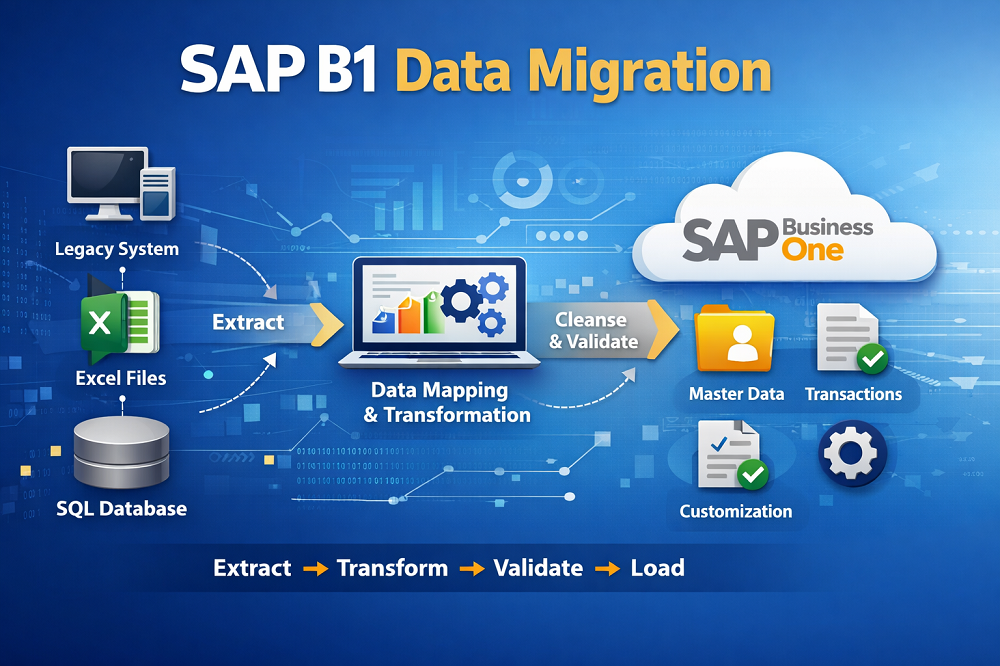
Have you ever wondered how a clean-core approach for SAP B1 Migration can change the way businesses move to a modern ERP without losing their most valuable asset — data?
This guide explains why a disciplined transfer matters for Indian SMEs and growing firms. Data is treated as business gold, and poor planning creates costly reconciliation after go-live.
The clean-core strategy prioritizes standard functionality and reduces excessive custom code. That keeps the ERP core easier to upgrade and supports cloud readiness.
We outline a controlled programme that covers process alignment, testing and change management. The approach splits into two main workstreams: clean and map records, and modernise the platform without breaking integrations.
The step-by-step promise is simple: protect data integrity, reduce downtime and deliver a lossless transition to sap business one.
Key Takeaways
- Prioritise standard features to keep upgrades smooth.
- Treat data as an asset and plan its cleansing early.
- Split work into data mapping and platform modernisation.
- Prepare thorough testing and rollback plans to reduce downtime.
- View the process as a controlled programme, not a simple copy-and-paste.
Why clean-core matters for sap business one migrations in India
A disciplined clean-core approach removes brittle changes and protects core business records during transitions. For Indian firms, faster upgrades, predictable costs and remote team support make a tidy core essential.
Clean-core fundamentals for ERP upgrades and cloud readiness
Keep standard processes in the core system and move unique workflows to extensions. Document every change and avoid hard-wired edits that block future upgrades. This lowers the effort for routine updates and eases moves to sap cloud solutions.
Where business one customisations typically create migration issues
- Bespoke add-ons that need rewiring for new releases.
- Undocumented stored procedures and altered tables causing data mismatches.
- Integrations that assume legacy formats and break on cutover.
| Customisation | Impact | Remedy |
| Bespoke add-on | Upgrade blocker | Refactor as extension |
| Altered fields | Data integrity risk | Standardise mappings |
| Legacy integrations | Cutover failures | Adaptor layer |
What “smooth transition” looks like for SMEs and growing businesses
A smooth transition means minimal downtime, reconciled master and transaction data, stable integrations and trained users. Fast issue resolution in the first weeks is part of best practices for a low-risk switch.
Decision lens: every step must reduce complexity, protect data and keep the system easy to upgrade. That view guides priorities from planning through go-live.
SAP B1 migration goals and scope definition before you start
Before any cutover, define clear goals that align with core business objectives and measurable outcomes.
Clarifying business needs, timelines, and success criteria
Begin by listing top business needs: speed, compliance, reporting and scalability. Translate these into ERP outcomes and measurable success criteria such as data accuracy, reduced manual workarounds and acceptable downtime windows.
Set a realistic time plan broken into preparation, rehearsal, go-live and stabilisation. Treat the rollout as a programme of steps, not a single event.
Identifying stakeholders, users, and collaboration requirements
Typical stakeholders for Indian businesses include finance leadership, operations, sales, procurement, warehouse, IT, the external sap partner and the hosting team.
Define who approves mapping, who validates UAT, who signs off reconciliation and who manages change requests. Early alignment on these roles reduces late-stage rework and protects a clean core.
| Role | Responsibility | Sign-off |
| Finance | Master data & reports | Reconciliation |
| Operations | Process validation | UAT approval |
| IT / Partner | Data transfer & integrations | Go-live readiness |
Assess your existing environment, data, and processes
Begin with a factual inventory of your environment and systems to reveal hidden dependencies and potential issues early.
Inventory of systems, integrations, and dependencies
Create a checklist that lists current software, database version, add-ons, reports and user roles. Include all connected systems such as e‑commerce, CRM, WMS, payroll and BI.
Document integrations with owners, transport method (API or file), schedules and identifiers. This makes it easier to spot where integrations will fail during migration.
Data assessment and clean-up
Profile data quality to spot duplicates, invalid values and missing fields. Standardise formats and remove obsolete records before any transfer.
Risk areas and time management
Define controls for extracts: restrict access, log transfers and encrypt files. Plan downtime windows to reduce operational disruption and protect sap data.
Deciding what to migrate
Master data — business partners, items and chart of accounts — is usually mandatory. Transaction data depends on reporting needs, audits and system performance.
| Checklist item | Why it matters | Action |
| Current version & database | Compatibility | Record and validate |
| Add-ons & customised reports | Upgrade blockers | Refactor or document |
| Integrations (APIs/file drops) | Cutover risk | Map owners and schedules |
| Open transactions | Business continuity | Decide open vs full history |
Practical step: set explicit cut‑over rules and align with finance and auditors. Keep the assessment factual to avoid quick fixes that create long‑term customisations.
Understand the SAP Business One data model to protect data integrity
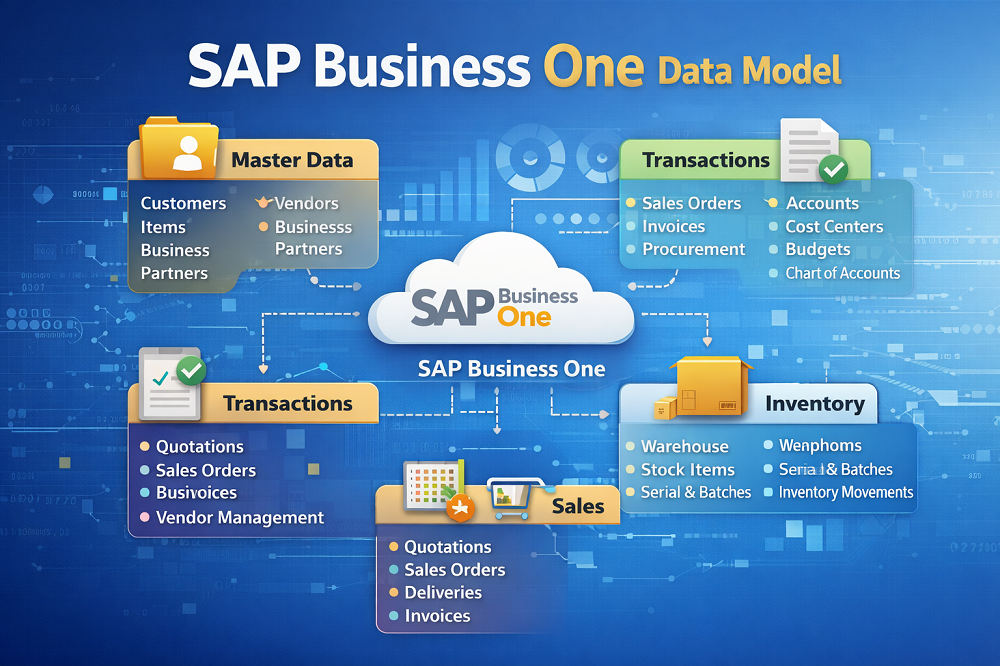
Mapping how customers, vendors and items relate helps prevent reconciliation headaches after go‑live. Familiarity with the data model stops simple imports from creating broken links that surface as billing, inventory or ledger errors.
Core entities and relationships
Business Partners are the central entity: customers and vendors live under a single partner record. Employees, items, warehouses and the chart of accounts all reference these keys.
- Master domains: business partners (customers/vendors), employee masters, item masters, price lists and warehouses.
- Relationships: sales rows, purchase rows and stock transactions tie back to master keys. Consistent keys prevent orphaned records.
Aligning legacy formats to new structures
Mismatched legacy codes cause duplicates, mixed address formats and conflicting tax IDs. Standardise codes, enforce mandatory fields and assign ownership for each dataset.
| Issue | Impact | Fix |
| Non-unique identifiers | Duplicate partners and reconciliation errors | Apply unique code scheme and dedupe |
| Mixed address formats | Failed deliveries and reporting gaps | Normalise address fields and templates |
| Conflicting tax IDs | Incorrect tax posting | Validate GST fields and map tax codes |
Safeguards: use consistent keys, validate relationships during transfer and apply controlled transformations. Correct modelling reduces custom code, preserves a clean core and makes future upgrades easier.
Build a detailed data mapping plan for a hassle-free upgrade
The safest route to an error-free cutover is a detailed, field-by-field mapping plan agreed by business and IT. A clear map prevents semantic errors that pass technical checks but fail real use.
Creating a field-by-field mapping document
Each mapping row must state the source field, target table/field, transformation rule, validation rule, default logic and an owner for sign-off. Include examples and sample values so owners can verify intent.
Standardising types and validation rules
Standardise dates, currencies, GST/tax formats and units of measure before loading. Strong validation rules reduce rejects and speed up the migration process.
Handling exceptions and redundancies
Prepare an exception playbook for missing values, incorrect formats, duplicates and obsolete records. Decide whether to correct, enrich, archive or exclude each case.
- Workshops with business and IT validate meaning, not just labels.
- Clean-core focus: good mapping lowers the urge to customise the core to fit messy data.
- Deliverables: signed mapping pack, transformation scripts and reconciliation reports (record counts and control totals).
| Output | Purpose | Owner |
| Mapping document | Field-level clarity | Data owner |
| Transformation scripts | Repeatable ETL | IT partner |
| Reconciliation pack | Go-live checks | Finance |
Select migration tools and set up your migration process
Choosing the right approach saves weeks of rework and protects accounting records. Start by matching tool scope to volume, transform complexity, entity count and the number of test loads you will run.
Using Data Transfer Workbench for extraction, transformation, and loading
Data Transfer Workbench supports master and transaction data across financials, sales, purchasing and inventory. It offers predefined Excel templates and a wizard-driven import that suits small and mid-sized firms.
DTW simulation and error files to prevent corruption and data loss
The Workbench validates via the DI API to reduce corruption risk and keep audit trails intact. Run a simulation first, review the generated error files, correct mapping or values, and re-run until the load is clean.
When third-party data migration tools make sense
Consider third-party data migration tools when you must consolidate multiple sources, apply heavy transforms, or build repeatable ETL pipelines across environments. They speed repeated testing and complex deduplication tasks.
- Governance: document all transformations and gain approvals to avoid hidden logic in the cutover layer.
- Practical workflow: select tool → map fields → simulate → fix errors → final load.
| Criteria | Best fit | Why |
| Low volume, simple maps | DTW | Excel templates, quick setup |
| Multi-source, heavy transforms | Third‑party tools | Advanced ETL and pipelines |
| Frequent test cycles | Automated tools | Repeatable, auditable loads |
Plan cloud migration to SAP Business One Cloud with clean-core in mind
Choosing a hosted business solution is a strategic step that should start with simplifying your system, not copying legacy complexity.
Why cloud fits Indian SMEs
Scalability and speed let businesses add users or capacity quickly without buying servers.
Cloud rollouts reduce in‑house infrastructure burden and make multi‑branch access and remote collaboration easier.
Concrete benefits to expect
- Scalable resources that grow with transaction volumes and users.
- Agility to change features or environments with minimal lead time.
- Remote access for hybrid teams and multi‑location operations.
- Lower dependency on onsite hardware and local backups.
Cost of ownership and subscription model
Monthly subscription fees often cost less than capital expenditure for servers, maintenance and backup. Budget for predictable monthly spend and support charges.
Include licence, storage, peak performance and incidental fees when comparing plans.
Provider reliability and support expectations
Evaluate uptime guarantees, upgrade cadence and incident response. Ensure vendor SLAs cover security, data residency and planned upgrade windows.
Choose the right plan for growth
Size storage and processing for peak transactions and concurrent users. Allow headroom for future growth and seasonal spikes.
Tie cloud planning to clean‑core: standardise and remove customisations so provider‑led upgrades run with minimal regression risk.
| Consideration | Why it matters | What to verify |
| Uptime & SLAs | Business continuity | 99.9%+ uptime, clear credits |
| Security & data residency | Regulatory compliance | Encryption, local data centres |
| Upgrade policy | Predictable time & effort | Scheduled windows, rollback options |
| Support & response | Fast issue resolution | Tiered SLAs, dedicated contacts |
| Performance & scaling | User experience | Benchmarks, auto‑scale capability |
Test thoroughly with mock migrations and user acceptance
Thorough rehearsal of data transfer and business flows shortens go‑live risk and builds confidence across teams. A disciplined testing plan uses a representative environment to validate the full solution before any cutover.
Building a representative test environment
Create a test copy with the same configuration, core integrations and masked production data. Ensure volumes mirror peak activity so performance and edge cases surface during tests.
User acceptance testing to confirm real processes work
UAT must cover end‑to‑end processes: quote‑to‑cash, procure‑to‑pay, inventory moves and finance close. Involve actual users to validate flows, not only IT staff.
Mock migrations as repeatable rehearsals
Run multiple mock data migration runs until mapping and transforms produce clean loads. Treat each run as a rehearsal: log errors, correct scripts and re‑execute.
- Acceptance criteria: reconciled totals, correct document flows, accurate tax behaviour and reports matching baselines.
- Validation checks: record counts, control totals and sample transaction audits.
- Governance: sign‑off from process owners for each tested area.
Incremental, phased transition to reduce impact
Move by entity group or business unit in phases. Validate each phase before proceeding. This reduces operational disruption and makes issue isolation faster.
| Test type | Purpose | Owner |
| Environment validation | Confirm config and integrations | IT partner |
| Mock data runs | Verify mapping and transforms | Data owner |
| User Acceptance Testing | Validate real business processes | Process owners / users |
Best practices: document all test results, fix root causes, and repeat until acceptance criteria are met. Thorough testing supports a smooth transition by catching integration breaks and performance issues early.
Go-live readiness: backup, rollback, and post-migration validation
Prepare before the cutover. Back up all user data, export critical master data snapshots and record restore steps in writing. A clear backup plan gives the team confidence and a reliable way back if a problem arises.
Backup and rollback planning to minimise business disruption
Create a rollback playbook with decision triggers and a time‑boxed rollback window. Assign roles for the restore, communications and approvals so everyone knows what to do and when.
Include contact points for technical support and a concise communication plan for business users. This reduces panic and speeds recovery should you need to revert.
Data verification and validation to ensure data integrity in sap business one
Run record counts, control totals and sampling checks for high‑risk entities: business partners, open AR/AP and stock valuations.
Use reconciliation sign‑offs from finance and operations to confirm the system matches source data. Keep audit logs of all checks and corrections.
Integration and performance testing for uninterrupted workflows
Validate end‑to‑end connectivity with downstream systems. Confirm batch jobs, interfaces and scheduled reports run within acceptable timeframes.
Prioritise interfaces that support critical processes such as invoicing, inventory updates and payroll.
Go-live monitoring to catch issues early and stabilise the environment
Provide heightened support coverage during the stabilisation period. Use structured triage, logging and daily reconciliation to surface and resolve issues fast.
Resist emergency customisations at cutover. Log workarounds and prioritise fixes for post‑go‑live sprints to preserve a clean core.
| Readiness item | Action | Owner |
| Full database backup | Perform nightly full backup; verify restore test | IT partner |
| Master data snapshot | Export key masters and store with checksums | Data owner |
| Rollback plan | Define triggers, window and communication steps | Project manager |
| Post-load verification | Record counts, control totals, sample audits | Finance |
| Integration checks | End-to-end interface and performance tests | Integration lead |
Conclusion
The right blend of tools, tests and training turns a risky transfer into a manageable programme. Summarise scope, assess and cleanse data, align to the business one erp model, map fields, pick the right ETL tools, validate with mock runs and run a controlled cut‑over.
Keep a clean core: avoid needless core customisations so upgrades, cloud adoption and long‑term support stay simple. Follow best practices for extracts, simulation and error handling to reduce surprises.
Operational goals for Indian SMEs are clear: accurate data, stable integrations, minimal downtime and confident users. Post‑go‑live support and structured training speed adoption and limit productivity dips.
Reduce risk with DTW simulation/error files, phased loads, repeated mock migrations and disciplined post checks and reconciliations. Engage experienced consultants for complex moves to ensure proven solutions and smooth outcomes.